


Overview
Turn inspiration into a shoppable list.
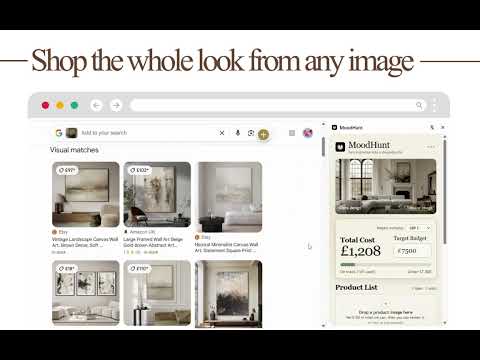
MoodHunt 1.1 is here: Break Down This Look with AI We've been closing the gap between "I love this image" and "I know exactly what's in it and where to buy it." Version 1.1 makes that jump in one click. Break Down This Look — AI Board Generator Upload an inspiration image and watch MoodHunt generate a professional specification board in seconds. The AI doesn't just label what's obvious. It reconstructs every element in the scene, even when things are layered, partially hidden, or tucked behind something else — the sofa behind the coffee table, the belt under the jacket, the rug under the chair. For interiors: a structured breakdown of furniture, lighting, and decor, plus a color palette and a materials palette with paint, flooring, tile, stone, and wood-finish recommendations. For fashion & style: clothing, accessories (bags, shoes, belts, jewelry), a fabric and materials palette (cotton, leather, silk, denim), and a style classification (streetwear, quiet luxury, minimalist, and more). Every element on the board flows straight into your MoodHunt list, so analysis becomes sourcing without a single copy-paste. 🔗 One Identity, Two Tools — Shared Wallet with Clara MoodHunt now shares a single account and credit wallet with Clara (clara.genesiai.com). Buy credits in either app and spend them in either app — generate AI boards in MoodHunt, design full rooms in Clara. No separate billing, no second login. 💳 Stripe Top-Up From the Side Panel Refill securely without leaving the extension. $5 for 10 premium credits, processed via Stripe, ready immediately. Tip: Just topped up and don't see your new balance next to your Google profile? A quick browser refresh will sync it. MoodHunt helps you turn an image you love into a practical, shoppable product list. Right-click a web image or upload your own inspiration, continue the search in Google Lens, and save product matches into a tidy side-panel list. You can add products from Lens, add products manually, compare alternatives from different merchants, edit prices and quantities, and keep only your selected option in the final budget. MoodHunt is useful for interiors, outfits, decor ideas, event styling, and other visual shopping projects. What You Can Do New in version 1.1.0 🆕 Break Down This Look — upload an inspiration image and let AI generate a full specification board, identifying every element in the scene, even items that are layered, partially hidden, or behind other objects. 🆕 Get a structured interior breakdown of furniture, lighting, decor, color palette, and materials palette (paint, flooring, tile, stone, wood finishes). 🆕 Get a structured fashion breakdown of clothing, accessories, fabric and materials palette, and style classification (streetwear, quiet luxury, minimalist, and more). 🆕 Send any element from an AI board straight into your MoodHunt product list — no copy-paste. 🆕 Sign in once and share a single account and credit wallet with Clara (clara.genesiai.com). Credits bought in either app work in both. 🆕 Top up credits via Stripe right from the side panel — $5 for 10 premium credits. Core features Upload an inspiration image and continue searching it in Google Lens. Right-click a web image and choose Search this image with MoodHunt to begin immediately. Add visual product matches from Google Lens with the MoodHunt button. Add products manually when you find something outside Google Lens. Drag a product image into the blank product card to prefill what MoodHunt can detect. Compare alternatives for the same product need, such as similar sofas from different merchants. Select the option you want to count toward the budget. Edit product names, unit prices, quantities, merchants, URLs, and thumbnails. Choose from 20 common project currencies. Track total cost against a target budget. Use Shop This List to open selected retailer product pages by merchant. Export a product list as CSV or printable PDF. Important Notes MoodHunt does not place orders, automate carts, collect payment, check stock, or complete checkout. Shop This List helps you review selected products and open retailer pages, where you complete any purchase yourself. Your projects, inspiration images, product lists, prices, and budgets are stored locally in your browser using Chrome storage and are not sent to Clara. The shared Clara wallet syncs only your MoodHunt account identity and credit balance — never your boards, lists, or browsing data.
5 out of 51 rating
Details
- Version1.1.3
- UpdatedJuly 8, 2026
- Size1.81MiB
- LanguagesEnglish
- DeveloperWebsite
Email
id.manage@gmail.com - Non-traderThis developer has not identified itself as a trader. For consumers in the European Union, please note that consumer rights do not apply to contracts between you and this developer.
Privacy

This developer declares that your data is
- Not being sold to third parties, outside of the approved use cases
- Not being used or transferred for purposes that are unrelated to the item's core functionality
- Not being used or transferred to determine creditworthiness or for lending purposes