

Moodbit: Visual exploration and moodboards for AI-native designers

Overview
Save UI and design inspiration to moodboards: screenshot and annotate any site, paste into Figma, hand it to Claude Code or Codex.
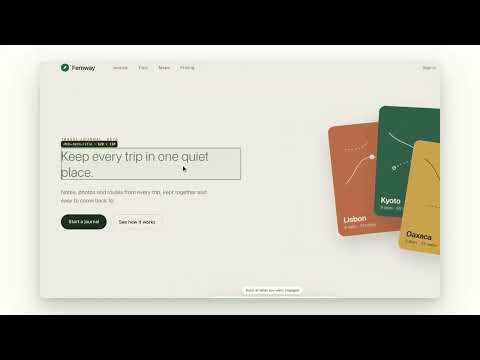
Moodbit keeps the design inspiration behind your work in moodboards, one for each project. You find something good on a website, you keep it, and it lands in the project you're working on. Save a page and Moodbit keeps the link, the title and a screenshot of what you were looking at. Right-click to keep just an image, a link or a bit of text. Or annotate the page: draw a box, an arrow or a highlight, pin a comment to it, and save. Your marks stay marks, drawn over a clean screenshot, so you can still see what you saw. Open Moodbit to sort, favourite and write notes. When you're ready to build, Compile for AI turns a project into one package Claude Code or Codex can work from: your words exactly as you wrote them, the images, and where every mark sits. A few quieter things: · Ctrl+M starts annotating on any page (Control, even on a Mac). · Switch on the dock for a small Moodbit tab on the edge of every website. · Export a project as a PDF contact sheet, with your comments down the margin. · Download a backup any time. It's one ZIP with everything in it. Your collection stays on your computer.
5 out of 53 ratings
Details
- Version0.1.3
- UpdatedNovember 18, 2026
- FeaturesOffers in-app purchases
- Size319KiB
- LanguagesEnglish
- Developer
- Non-traderThis developer has not identified itself as a trader. For consumers in the European Union, please note that consumer rights do not apply to contracts between you and this developer.
Privacy

Moodbit: Visual exploration and moodboards for AI-native designers has disclosed the following information regarding the collection and usage of your data. More detailed information can be found in the developer's privacy policy.
Moodbit: Visual exploration and moodboards for AI-native designers handles the following:
This developer declares that your data is
- Not being sold to third parties, outside of the approved use cases
- Not being used or transferred for purposes that are unrelated to the item's core functionality
- Not being used or transferred to determine creditworthiness or for lending purposes
Support
For help with questions, suggestions, or problems, please open this page on your desktop browser