


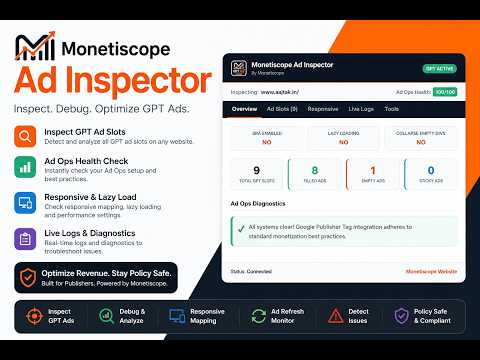
Overview
Inspect, debug, and analyze Google Publisher Tag (GPT) ads, Google Ad Manager (GAM) setups, and responsive size mappings.
Monetiscope Ad Inspector is a powerful, lightweight Chrome Extension designed for publishers, developers, ad operations teams, and Google Ad Manager users to inspect, debug, and optimize Google Publisher Tag (GPT) ads with ease. Take full control of your website's ad setup. Visually highlight ad slots, inspect live Google Ad Manager (GAM) configurations, monitor real-time ad refreshes, verify responsive size mappings, identify rendering bottlenecks, and protect your monetization revenue from policy violations. Whether you are running Google Ad Manager (GAM), Google AdSense, DoubleClick, Ad Exchange (AdX), Open Bidding, or complex responsive display setups, Monetiscope Ad Inspector provides deep, visual diagnostic tools directly on any webpage without slow page weight or registration traps. -------------------------------------------------- 🌟 KEY BENEFITS: 👉 100% Free & No Sign-Up: Gain immediate, gateless access to the entire diagnostic dashboard. No login, no email registration, and no barriers on your first launch. 👉 Instant Sub-Millisecond Loading: Engineered with zero heavy frameworks or dependencies, our popup dashboard loads in milliseconds with a near-zero memory footprint. 👉 Click-Through Highlights: Toggle visual borders around live containers while retaining click-through capabilities to test the underlying ad creatives. 👉 Privacy First: The extension does not collect your browsing history, inject external ads, or harvest sensitive personal data. All diagnostic scanning is strictly local. -------------------------------------------------- 🔥 POWERFUL FEATURES: 1. Detect GPT Presence & Core Architecture Quickly verify if Google Publisher Tag (GPT) is active. Instantly view critical page-level setups: • Single Request Architecture (SRA) status • Lazy Loading configuration (fetch & render margins) • Collapse Empty Divs status (before/after ad fetch) 2. Visually Highlight Ads with Interactive Diagnostic Cards Draw clear dashed borders around live ad slot containers (Green for filled, Red for empty, Blue for sticky/anchor units). Each highlighted container includes a premium floating card showing: • Supply Source (Dynamic Allocation vs Direct GAM) • Filled size metrics & Div ID • Click-to-copy Ad Unit Path • Hyperlinked Creative ID and Line Item ID that open delivery detail tools directly inside your Google Ad Manager Console. • Auto-repositions inside the container if the ad is at the very top of the page to avoid off-screen cutoffs. 3. Interactive Ad Slots Auditor Scan all slots on the page in a compact list view. Easily search/filter slots by Div ID or Ad Unit Path, copy paths, view allowed sizes, active creative metrics, and toggle targetings key-value tables. 4. Responsive Size Mapping Inspector Inspect how your ads respond to device widths. Displays a clear, readable breakdown of your googletag.sizeMapping() configurations, showcasing allowed creative sizes for each viewport breakpoint. 5. Real-Time GPT Event Monitoring Logs Watch GPT lifecycle events stream live. Monitor requested slots, received responses, render completions, viewability counts, and refresh events with millisecond-exact timestamps and search filters. 6. Auto-Calculated Ad Ops Health Score & Warnings Avoid suspension risks with automated diagnostics. The extension evaluates: • High Ad Density above the fold (warning if exceeding the Google 30% viewport limit) • Excessive Sticky Ads (warning if multiple floating units block layout content) • Aggressive Refresh Intervals (warning if slots auto-refresh in less than Google's required 30s limit) 7. Copy & Export Debugging Data Export your ad stack audit as a formatted JSON structure or copy the raw payload directly to your clipboard to send to your development teams. -------------------------------------------------- 🎯 BEST FOR: • Publishers: Maximize CPM, improve fill rates, and fix layout shifts. • Ad Ops Teams: Troubleshoot line item deliveries and dynamic allocations instantly on live web pages. • Web Developers: Verify that GPT scripts, div containers, and responsive breakpoints load properly. • Website Owners & Media Companies: Audit hybrid setups (AdSense, AdX, Header Bidding) to ensure premium ad density and user experiences. -------------------------------------------------- 🛠️ SUPPORTED AD TECHS: • Google Publisher Tag (GPT) • Google Ad Manager (GAM) / DoubleClick • Google AdSense & Ad Exchange (AdX) • Responsive Display & Native Ads • Sticky, Anchor, Interstitial, & Floating units • Header Bidding setups -------------------------------------------------- Monetiscope Ad Inspector is the ultimate debugging tool for modern publishers. Optimize your ad setup, safeguard your monetization policy compliance, and scale your programmatic revenue today!
5 out of 51 rating
Details
- Version1.0.1
- UpdatedJune 8, 2026
- Size1022KiB
- LanguagesEnglish
- DeveloperWebsite
Email
support@monetiscope.com - Non-traderThis developer has not identified itself as a trader. For consumers in the European Union, please note that consumer rights do not apply to contracts between you and this developer.
Privacy

This developer declares that your data is
- Not being sold to third parties, outside of the approved use cases
- Not being used or transferred for purposes that are unrelated to the item's core functionality
- Not being used or transferred to determine creditworthiness or for lending purposes