

Inbox Paint – Color Rules for Gmail

Overview
Automatically color-code Gmail with simple visual rules. Private, fast, and processed locally.
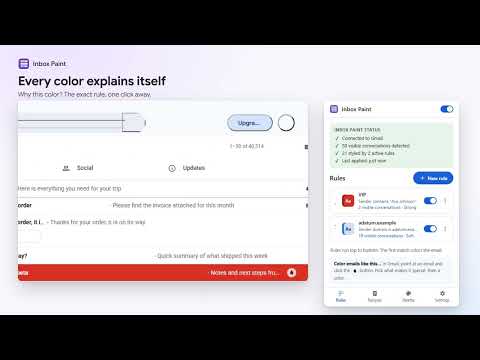
Make important email impossible to miss. Inbox Paint automatically highlights Gmail conversations based on rules you create — for example, client emails in blue, invoices in orange, or unread messages in yellow. Rules run locally in your browser. Inbox Paint never opens, moves, deletes, labels, archives or sends your email. COLOR EMAILS LIKE THIS… • Point at any email in Gmail and click the Inbox Paint button. • Pick what makes it special: this sender, their whole company domain, a word in the subject, or a Gmail label. • See how many visible conversations match before you save. Every matching email changes color at once. WHY IS THIS EMAIL THIS COLOR? • Open the same button on any colored email to see the rule behind it. • Edit the rule, turn it off, or make an exception for one sender or one conversation. A CALM, SCANNABLE INBOX • Three looks: Accent (a thin color rail), Soft (a light tint) and Strong (full color with readable text). • "Calm my inbox" starts new rules as a quiet rail. • Works in light and dark Gmail themes. Gmail's own selection, hover actions, stars and unread bold keep working. RULES WITHOUT THE HASSLE • Match by sender name or address, sender domain, subject, preview text, labels, unread or starred. • Combine conditions (all or any), add exceptions, reorder by priority. The first match wins. • Recipes to start fast: VIP people, work and clients, money, travel, newsletters, unread attention. • The rule list shows how many visible emails each rule colors, and when a higher rule wins. RELIABLE AND PRIVATE • A status panel shows it's working: conversations detected, how many are styled, and when. • If a Gmail update changes the page, Inbox Paint stops styling and tells you, instead of coloring the wrong emails. • No sign-in, no Gmail API, no server. Nothing leaves your browser. • Only two permissions: storage for your rules, and access to mail.google.com to color rows. • Rules and colors sync through your own Chrome profile. Import and export them as a file. EARLY ACCESS All features are unlocked during early access. If a paid plan is added later, everything you set up now stays unlocked for you. Inbox Paint is an independent extension. It is not affiliated with or endorsed by Google. Gmail is a trademark of Google LLC.
0 out of 5No ratings
Details
- Version1.0.0
- UpdatedSeptember 20, 2026
- Offered bysupport
- Size107KiB
- LanguagesEnglish
- Developer
Email
support@enuf.ai - Non-traderThis developer has not identified itself as a trader. For consumers in the European Union, please note that consumer rights do not apply to contracts between you and this developer.
Privacy

Inbox Paint – Color Rules for Gmail has disclosed the following information regarding the collection and usage of your data. More detailed information can be found in the developer's privacy policy.
Inbox Paint – Color Rules for Gmail handles the following:
This developer declares that your data is
- Not being sold to third parties, outside of the approved use cases
- Not being used or transferred for purposes that are unrelated to the item's core functionality
- Not being used or transferred to determine creditworthiness or for lending purposes
Support
For help with questions, suggestions, or problems, visit the developer's support site