


ภาพรวม
Add, modify or remove a header for any request on desired domains.
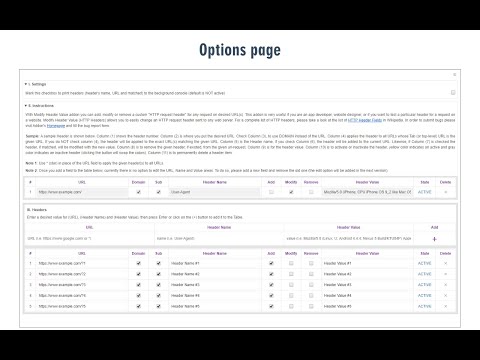
Modify Header Value (HTTP Headers) is an extension that can add, modify or remove an HTTP-request-header for all requests on a desired website or URL. This Addon is very useful if you are an App developer, website designer, or if you want to test a particular header for a request on a website. Key features: 1. Easily add, modify or remove a header for any request on desired domains. 2. For a complete list of HTTP headers, please take a look at the list of all HTTP Header Fields on the Wikipedia page (https://en.wikipedia.org/wiki/List_of_HTTP_header_fields). 3. Clicking on the Toolbar icon opens a UI to quickly switch the Addon ON or OFF, or open the options page. 4. Each header item has several options to adjust (see add-on's Options page for details) 5. You can add several header items and active or inactive them separately. 6. An example in the options page shows a tutorial on "How to add a custom header". Note: to report bugs, please visit addon's homepage (https://mybrowseraddon.com/modify-header-value.html) and fill out the bug report form.
3.4 จาก 5 คะแนนการให้คะแนน 50 รายการ
รายละเอียด
- รุ่น0.2.0
- อัปเดตแล้ว7 เมษายน 2568
- นำเสนอโดยGrephy
- ขนาด95.87KiB
- ภาษาEnglish
- นักพัฒนาซอฟต์แวร์
อีเมล
grephyr.prj@gmail.com - ไม่ใช่ผู้ค้านักพัฒนาซอฟต์แวร์รายนี้ไม่ได้ระบุว่าตัวเองเป็นผู้ค้า สำหรับผู้บริโภคในสหภาพยุโรป โปรดทราบว่าสิทธิของผู้บริโภคไม่มีผลกับสัญญาระหว่างคุณกับนักพัฒนาซอฟต์แวร์รายนี้
ความเป็นส่วนตัว

นักพัฒนาซอฟต์แวร์รายนี้ประกาศว่าข้อมูลของคุณจะ
- ไม่ถูกขายไปยังบุคคลที่สามหากไม่ใช่ Use Case ที่ได้รับอนุมัติ
- ไม่ถูกใช้หรือถูกโอนเพื่อวัตถุประสงค์ที่ไม่เกี่ยวข้องกับฟังก์ชันการทำงานหลักของรายการ
- ไม่ถูกใช้หรือถูกโอนเพื่อพิจารณาความน่าเชื่อถือทางเครดิตหรือเพื่อวัตถุประสงค์การให้สินเชื่อ
สนับสนุน
โปรดไปที่เว็บไซต์สนับสนุนของนักพัฒนาซอฟต์แวร์ หากมีข้อสงสัย ต้องการขอคำแนะนำ หรือพบปัญหาใดๆ