Item logo image for Mobile to Figma - Veqo

Mobile to Figma - Veqo

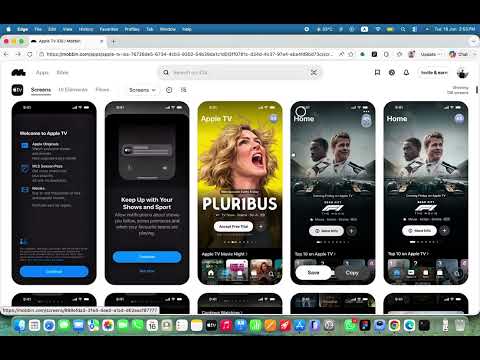
Item media 4 (screenshot) for Mobile to Figma - Veqo
Item video thumbnail
Item media 2 (screenshot) for Mobile to Figma - Veqo
Item media 3 (screenshot) for Mobile to Figma - Veqo
Item media 4 (screenshot) for Mobile to Figma - Veqo
Item video thumbnail
Item media 2 (screenshot) for Mobile to Figma - Veqo
Item media 3 (screenshot) for Mobile to Figma - Veqo
Item media 4 (screenshot) for Mobile to Figma - Veqo

Overview

Select any area of a mobile screen, capture it, and jump straight into the Veqo Figma plugin to design from it.

Veqo – Mobile to Figma Transform mobile apps into fully editable Figma designs in seconds. Veqo captures mobile screens and converts them into structured Figma layers, preserving layouts, spacing, typography, colors, and visual hierarchy. Unlike simple screenshot importers, Veqo generates editable design files that can be customized and reused instantly. Features: • Convert mobile screens to editable Figma designs • Extract UI components automatically • Generate reusable design systems • Detect colors, typography, and design tokens • Create organized layers and Auto Layout structures • Fast one-click workflow • Works with modern mobile interfaces Perfect for UI/UX designers, product designers, developers, and design teams who want to analyze, redesign, iterate, or learn from mobile experiences without rebuilding screens manually. Save hours of work and turn inspiration into editable design assets with Veqo.

Details

  • Version
    1.0.0
  • Updated
    June 19, 2026
  • Offered by
    omarashrafwork1
  • Size
    15.68KiB
  • Languages
    English
  • Developer
    OMAR ASHRAF ABOELGHAIT ABDELWAHAB ABOELNAGA
    3 شارع الوقف خلف الساحة الشعبية المنصورة, الدقهلية 35511 EG
    Email
    omarashrafwork1@gmail.com
    Phone
    +20 15 50194471
  • Trader
    This developer has identified itself as a trader per the definition from the European Union and committed to only offer products or services that comply with EU laws.

Privacy

Manage extensions and learn how they're being used in your organization

Mobile to Figma - Veqo has disclosed the following information regarding the collection and usage of your data. More detailed information can be found in the developer's privacy policy.

Mobile to Figma - Veqo handles the following:

Website content

This developer declares that your data is

  • Not being sold to third parties, outside of the approved use cases
  • Not being used or transferred for purposes that are unrelated to the item's core functionality
  • Not being used or transferred to determine creditworthiness or for lending purposes

Related

Over.fig – Compare design to website in real time

4.6

Bridge the gap between design and code. Convert your Figma into a pixel-perfect semi-transparent overlay directly on your web page.

Figma to Bubble Converter

5.0

Convert your Figma designs into responsive, pixel-perfect Bubble elements in just a few clicks — for free.

InspoAI — Screenshot to Figma & HTML to Figma Converter

5.0

Capture any webpage and convert it to an editable Figma design in one click. Screenshot to Figma, HTML to Figma, instantly.

Awesome Screenshot – Free Screenshot & Screen Capture Tool

0.0

Select an area of the current page and then copy, save, or draw on the screenshot.

Web to Figma

2.1

Web to Figma extension to capture pages and components and import them into Figma as editable designs. No more screenshots.

Copy to Design - Web to Design

5.0

Capture webpage elements and copy them to design tools, including Figma, MasterGo, and Axure.

MobileLens – Mobile Simulator

0.0

Simulate mobile browsers by spoofing user agent, headers, and viewport for UX testing.

Copy web to Figma - 复制为可编辑设计稿,无需安装Figma插件

5.0

一键复制网页转换为可编辑的 Figma 设计稿,支持任何网站,无需Figma插件,免费使用

HTML to Figma: Convert Websites into Designs & Wireframes by Wireframeit

3.7

Convert any webpage into an editable design or wireframe. Export to Figma, SVG, PNG, or JPG.

HTML to Figma – Capture Any Website as Editable Layers

5.0

Capture any webpage and paste it into Figma as real, editable frames and text — not a flat screenshot. Free Chrome extension.

html.to.design

4.6

Convert any website into fully editable Figma designs. Requires the associated Figma plugin!

Veqo — HTML to Design

4.2

Veqo — Capture any webpage and import it into Figma as editable design. Auto-scrolls, extracts components and builds design systems.

Over.fig – Compare design to website in real time

4.6

Bridge the gap between design and code. Convert your Figma into a pixel-perfect semi-transparent overlay directly on your web page.

Figma to Bubble Converter

5.0

Convert your Figma designs into responsive, pixel-perfect Bubble elements in just a few clicks — for free.

InspoAI — Screenshot to Figma & HTML to Figma Converter

5.0

Capture any webpage and convert it to an editable Figma design in one click. Screenshot to Figma, HTML to Figma, instantly.

Awesome Screenshot – Free Screenshot & Screen Capture Tool

0.0

Select an area of the current page and then copy, save, or draw on the screenshot.

Web to Figma

2.1

Web to Figma extension to capture pages and components and import them into Figma as editable designs. No more screenshots.

Copy to Design - Web to Design

5.0

Capture webpage elements and copy them to design tools, including Figma, MasterGo, and Axure.

MobileLens – Mobile Simulator

0.0

Simulate mobile browsers by spoofing user agent, headers, and viewport for UX testing.

Copy web to Figma - 复制为可编辑设计稿,无需安装Figma插件

5.0

一键复制网页转换为可编辑的 Figma 设计稿,支持任何网站,无需Figma插件,免费使用

Google apps