

Mobile Simulator & Responsive View Workspace – CaIoT
7 ratings
)
Overview
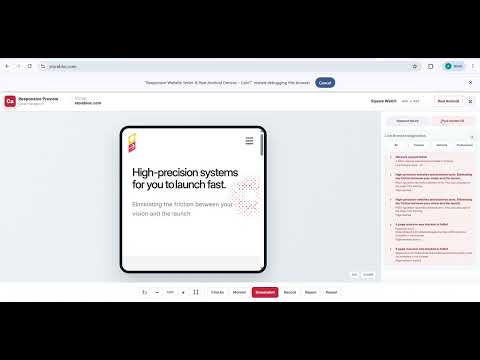
Free mobile simulator and responsive view previewer with built-in console logging and 1-click testing on physical Android devices.
🚀 Stop guessing how your websites look on real hardware. CaIoT is a premium responsive testing workspace built directly into your Chrome browser—giving developers, QA engineers, and designers a physical hardware bridge that standard emulators completely miss. 🌟 WHY CAIOT IS DIFFERENT Most testing tools just resize an iframe. CaIoT combines responsive presets, real-time diagnostic monitoring, and instant routing to an actual physical device lab. 🛠️ CORE FEATURE SUITE 1️⃣ MOBILE SIMULATOR & RESPONSIVE VIEW • Preview any active tab across 27+ pre-configured mobile, tablet, desktop, and wearable viewports. • Create completely custom viewport sizes to match specific device fragmentation. • Rotate views, adjust layout zoom, and test safe-area layouts easily. • Use "Live Page" bypass mode for websites that block standard iframe embedding. 2️⃣ LIVE DIAGNOSTIC MONITOR • Review browser console messages, warnings, and JavaScript exceptions instantly. • Detect blocked API endpoints, failed network requests, and CORS infrastructure errors. • Monitor core performance risks including Web Vitals (LCP, CLS, TTFB). • Zero cluttered tabs—diagnostic badges count issues cleanly right over the extension icon. 3️⃣ REAL HARDWARE VALIDATION • Seamlessly jump from local visual simulation into a real physical Android device. • Instantly route your staging link to our physical device lab to validate true chromium rendering, touch latencies, and device battery performance. https://responsivetest.ca/
5 out of 57 ratings
Details
- Version1.12.2
- UpdatedOctober 9, 2026
- Offered byCaIoT Inc
- Size120KiB
- LanguagesEnglish (United States)
- DeveloperCAIOT INC.
2906 Westbury Ct Mississauga, ON L5M 6B2 CAEmail
team@caiot.coPhone
+1 437-733-4868 - TraderThis developer has identified itself as a trader per the definition from the European Union and committed to only offer products or services that comply with EU laws.
- D-U-N-S243334733
Privacy

Mobile Simulator & Responsive View Workspace – CaIoT has disclosed the following information regarding the collection and usage of your data. More detailed information can be found in the developer's privacy policy.
Mobile Simulator & Responsive View Workspace – CaIoT handles the following:
This developer declares that your data is
- Not being sold to third parties, outside of the approved use cases
- Not being used or transferred for purposes that are unrelated to the item's core functionality
- Not being used or transferred to determine creditworthiness or for lending purposes
Support
For help with questions, suggestions, or problems, visit the developer's support site