

Mobile phone emulator - test websites
8 ratings
)
Overview
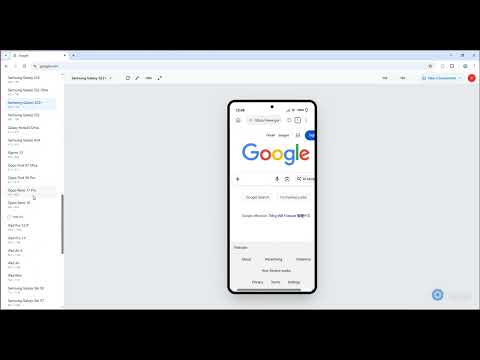
Responsive mobile emulator to test web layouts and designs.
Sure thing! For the Chrome Web Store or other extension marketplaces, an English description needs to be punchy, keyword-rich, and focused on the developer's pain points. Here is a professional, SEO-optimized English description for your tool: Mobile Phone Emulator - Responsive Web Design Tester Elevate your responsive web development workflow with the ultimate Mobile Phone Emulator. Stop guessing how your website looks on mobile. Mobile Phone Emulator is a powerful, lightweight extension designed for developers and designers to simulate real-world mobile devices and tablets directly within their desktop browser. Key Features for Developers: Comprehensive Device Library: Instantly fake environments for iPhone (iOS), Samsung Galaxy, Google Pixel, and popular tablets. One-Click Orientation: Seamlessly switch between Portrait and Landscape modes to test layout reflow. Accurate Viewport Simulation: Test specific screen resolutions and CSS media queries with pixel-perfect accuracy. User-Agent Spoofing: Automatically switch User-Agent strings to test how servers handle different mobile browsers. Mobile Touch Simulation: Emulate touch events and scrolling behavior just like a real smartphone. Why Choose This Emulator? Boost Productivity: No need to switch between physical devices. Test everything in one tab. SEO & UX Optimization: Ensure your site meets Google’s "Mobile-Friendly" standards to improve rankings. Debugging Made Easy: Works perfectly with Chrome DevTools for inspecting elements on simulated mobile screens. Ultra-Lightweight: Minimal impact on browser performance, ensuring a smooth coding experience. How to Use: Install the extension and pin it to your toolbar. Navigate to the website you want to test. Click the Mobile Phone Emulator icon. Select your target device and start debugging!
5 out of 58 ratings
Details
- Version1.0.8
- UpdatedMay 26, 2026
- Offered byhizone
- Size167KiB
- LanguagesEnglish
- Developer
Email
vansy87hp@gmail.com - Non-traderThis developer has not identified itself as a trader. For consumers in the European Union, please note that consumer rights do not apply to contracts between you and this developer.
Privacy

Mobile phone emulator - test websites has disclosed the following information regarding the collection and usage of your data. More detailed information can be found in the developer's privacy policy.
Mobile phone emulator - test websites handles the following:
This developer declares that your data is
- Not being sold to third parties, outside of the approved use cases
- Not being used or transferred for purposes that are unrelated to the item's core functionality
- Not being used or transferred to determine creditworthiness or for lending purposes
Support
For help with questions, suggestions, or problems, please open this page on your desktop browser