


概要
Batch download high quality photos, videos, reels, stories from Instagram, X, Facebook, and more!
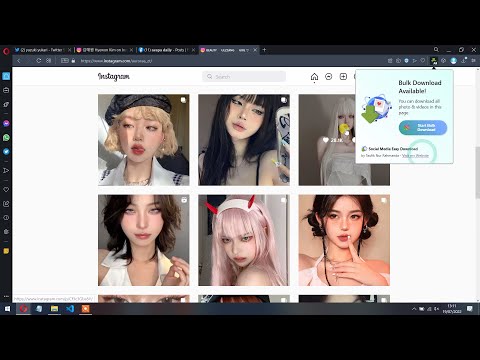
You can download all photos, videos, reels, and stories from Instagram, Facebook, Pinterest, and Twitter. This extension will detect media on opened social media pages and opened tabs, and then you can download, preview, or batch download multiple photos and videos from multiple posts of your choosing in the highest definition and higher quality. How to Use? 1. Download HQ Photos & Videos from Facebook, Instagram, and Twitter Open any post page containing photo or video, then you can click the button which appeared on the top right of the post, or by clicking the extension icon on the right side of the address bar. After that, the popup containing preview of detected photos & videos will appear. From there you can click "Download Selected", "Open in New Tab", or "Download All". 2. Batch Download Photos & Videos from any Instagram Page Open any Instagram profile page, and then click on the extension icon. You'll see "Batch Download" button. After clicking that button, click on any post and the bulk download will start. To stop the operation, just click the extension icon and click "Stop Batch Download". 3. Download Facebook Story Open a Facebook profile or page, click on the profile picture, then click View Story. After the story view opened, reload the page. After the page reloaded, you will see the download button appeared on the top right of the media, or click on the extension icon to view all detected media from the Facebook story. Demo Video: https://youtu.be/6rmq7gcCjqU Hope you enjoy!
5 点満点で 2.99 件の評価
詳細
- バージョン1.0.9
- 更新:2024年3月12日
- 提供元TaufikNur Production
- サイズ252KiB
- 言語English
- デベロッパー
メール
flias.test@gmail.com - 非取引業者このデベロッパーは取引業者として申告していません。EU 加盟国の消費者とこのデベロッパーとの間に締結された契約には、消費者の権利が適用されません。
プライバシー

このデベロッパーは、お客様のデータについて以下を宣言しています
- 承認されている以外の用途で第三者に販売しないこと
- アイテムの中心機能と関係のない目的で使用または転送しないこと
- 信用力を判断する目的または融資目的で使用または転送しないこと