

Volume Booster & Tab Volume Control - Tonobel

Overview
Volume booster for any tab: up to 600% without distortion, full screen still works, volume remembered per site. No data collected.
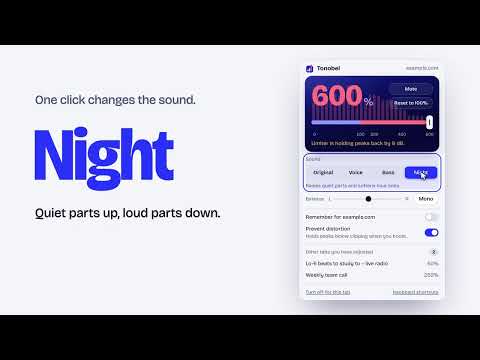
Tonobel is a volume booster for Chrome that makes any tab louder, up to 600%, and gives each tab its own volume control. Use it as a sound booster for a quiet video, call or lecture: click the icon and drag the slider past 100%. The boost applies to that tab only; every other tab keeps its own level. WHAT YOU GET • Volume boost up to 600% without distortion. A built-in limiter holds peaks below clipping, so loud passages do not crackle. • Full screen keeps working. A video still fills the whole screen while its tab is boosted. • Volume remembered per site. Turn on "Remember" and that level is applied as soon as you click the icon on that site. • Voice mode for clearer speech, Bass mode for more low end, and Night mode, which works as a volume normalizer: it raises quiet parts and softens loud ones. • Left and right audio balance, and mono audio. • A list of the tabs you have adjusted, so you can switch to one with a click. • Keyboard shortcuts for volume up, volume down, mute and reset. HOW TO MAKE A CHROME TAB LOUDER 1. Open the tab that is too quiet and click the Tonobel icon. 2. Drag the slider. 0 to 100% lowers the volume, 100 to 600% increases it past the maximum. 3. Click "Turn off for this tab" to hand the sound back to Chrome. IS THIS VOLUME BOOSTER EXTENSION SAFE? Tonobel collects no data. It runs no code inside your pages. Its security policy blocks every network request, so nothing can leave your browser, and your settings are stored on your device only. It is free, with no ads and no account. GOOD TO KNOW • Chrome shows its own indicator on a tab while an extension is processing that tab's sound. • Chrome does not allow extensions to run on its own pages, such as the Chrome Web Store and settings. • Small laptop speakers can sound harsh at a very high boost. Raise the level gradually. • Requires Chrome 116 or later. Google Chrome is a trademark of Google LLC. This extension is not affiliated with or endorsed by Google.
0 out of 5No ratings
Details
- Version1.0.1
- UpdatedNovember 19, 2026
- Offered byVibeWorks
- Size176KiB
- Languages13 languages
- Developer
Email
hhazbay@gmail.com - Non-traderThis developer has not identified itself as a trader. For consumers in the European Union, please note that consumer rights do not apply to contracts between you and this developer.
Privacy

This developer declares that your data is
- Not being sold to third parties, outside of the approved use cases
- Not being used or transferred for purposes that are unrelated to the item's core functionality
- Not being used or transferred to determine creditworthiness or for lending purposes
Support
For help with questions, suggestions, or problems, please open this page on your desktop browser