

Console Copy
11 ratings
)
Overview
Capture & analyze console logs with on-device AI Assistant (Gemini Nano) and Lighthouse-style Page Analysis. Filters, search, export
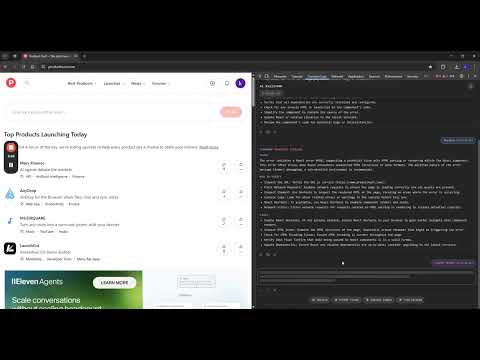
Console Copy is a powerful developer toolkit that captures, analyzes, and exports browser console logs — with on-device AI (Chrome's built-in Gemini Nano) and a Lighthouse-style Page Analysis built in. 🚀 Headline features ✨ AI Assistant On-device log analysis via Chrome's Prompt API. Pinpoints root cause, drafts ready-to-paste Jira/Linear/GitHub tickets, explains errors in plain language, and finds related logs. 65+ output languages, fully editable system prompt. No data leaves your device. 🛠 Page Analysis (New!) One-click Lighthouse-style audit of the current page: - Core Web Vitals: LCP, FCP, CLS, INP, TBT, TTFB - Resource & request breakdown with waterfall - Technology fingerprinting — frameworks, CMS, analytics, CDN - SEO, Accessibility, Security headers checks - AI-prioritized recommendations - History & comparison between runs - Optional Deep Analysis attaches Chrome's debugger to surface unused-CSS bytes and site storage usage 📡 Real-time capture Logs, errors, warnings, network failures, uncaught exceptions, and promise rejections — intercepted from document_start. Repeated messages collapse with a counter badge. 🔔 Toast notifications Configurable on-page alerts for new logs with one-click AI analysis straight from the toast. 🎯 Filter & search Per-type filters, case-sensitive search, keyboard navigation through matches (Enter / Shift+Enter). 📤 Export Copy filtered logs as Plain Text, JSON, or Markdown — ready to paste into bug reports, docs, or chat. 🛠 DevTools integration Full-featured DevTools panel + browser-action popup; both surfaces share state and AI conversation. 🎨 UX Auto light/dark theme matching DevTools, full context menu (copy / delete / AI actions per log row). ⚡ Performance Per-tab log limit (100–50,000 entries) with IndexedDB for large buffers; renders thousands of rows smoothly. 🔒 Privacy first Everything runs locally in your browser. AI inferences, page snapshots, and settings stay on your device — no telemetry, no servers, no tracking. 📖 Quick start 1. Click the extension icon, or open DevTools (F12) → "Console Copy" tab 2. Click 🛠 in the toolbar to run Page Analysis, or ✨ on any log row to ask the AI Assistant 3. Use filters, search, and export to share findings 🧪 Try the demo: https://kobrynovych.github.io/ConsoleCopy
5 out of 511 ratings
Details
- Version5.0.3
- UpdatedJuly 12, 2026
- Offered byKobrynovych
- Size130KiB
- LanguagesEnglish
- Developer
Email
kobrynovych@gmail.com - Non-traderThis developer has not identified itself as a trader. For consumers in the European Union, please note that consumer rights do not apply to contracts between you and this developer.
Privacy

This developer declares that your data is
- Not being sold to third parties, outside of the approved use cases
- Not being used or transferred for purposes that are unrelated to the item's core functionality
- Not being used or transferred to determine creditworthiness or for lending purposes
Support
For help with questions, suggestions, or problems, visit the developer's support site