


Overview
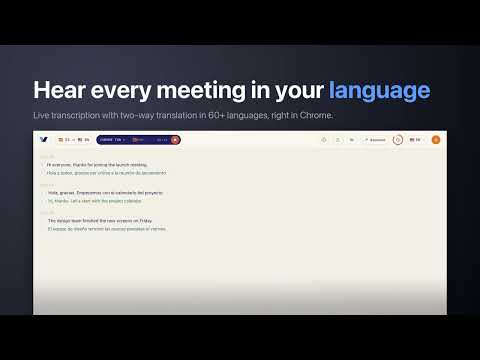
Translate any Chrome tab live with original and translated captions in 60+ languages.
Understand meetings, videos, webinars, and livestreams playing in Chrome. Verli turns audio from the Chrome tab you choose into live original and translated captions in 60+ languages. Nothing joins your call, and the extension does not need access to every website. HOW IT WORKS 1. Open the Verli side panel and choose the spoken and translation languages. 2. Select Sign up / Sign in to start. 60 minutes of real-time translation upon sign-up. 3. After sign-in returns, select the same button to open Chrome's sharing picker. 4. Choose a Chrome tab, turn on Share tab audio, and read the original and translation together. VERLI ACCOUNT You can inspect the interface and language choices before creating an account. Recording requires a Verli account and uses its available minutes. The side panel supports live captions, transcript copy and download, and explicit saving to meeting history. Open the full Verli extension console for optional microphone mixing, knowledge-base presets, saved meetings and History, AI summaries, and live sharing. Billing actions open hosted Verli, RevenueCat, or Stripe pages. Payment details are not entered into the extension. BUILT FOR AUDIO PLAYING IN CHROME - Google Meet, Zoom Web, and Microsoft Teams Web - YouTube videos and livestreams - Webinars, lectures, interviews, and browser-based calls - Any other Chrome tab that exposes shared tab audio PRIVACY AND CONTROL Chrome asks you to choose a tab every time you start. Verli streams only that tab's audio to Soniox for live transcription and translation. In the full console, Mic is optional and Chrome requests separate microphone permission when it is enabled. Verli does not collect the selected tab's URL or title and does not retain raw audio. Transcript text is sent to Verli only for an account feature the user chooses, such as saving a meeting, generating an AI summary, or creating a live share. IMPORTANT Verli is an automated transcription and translation tool. Results can contain errors. Tell other participants that their audio is being processed and follow the recording and consent laws that apply where you live.
0 out of 5No ratings
Details
- Version0.2.47
- UpdatedOctober 1, 2026
- FeaturesOffers in-app purchases
- Size1.72MiB
- LanguagesEnglish
- DeveloperINKVI LLCWebsite
1517 6TH Ave W APT 306 Seattle, WA 98119-3259 USEmail
dev@inkvi.comPhone
+1 206-504-3364 - TraderThis developer has identified itself as a trader per the definition from the European Union and committed to only offer products or services that comply with EU laws.
- D-U-N-S106469238
Privacy

Verli: Live Translator has disclosed the following information regarding the collection and usage of your data. More detailed information can be found in the developer's privacy policy.
Verli: Live Translator handles the following:
This developer declares that your data is
- Not being sold to third parties, outside of the approved use cases
- Not being used or transferred for purposes that are unrelated to the item's core functionality
- Not being used or transferred to determine creditworthiness or for lending purposes
Support
For help with questions, suggestions, or problems, visit the developer's support site