


總覽
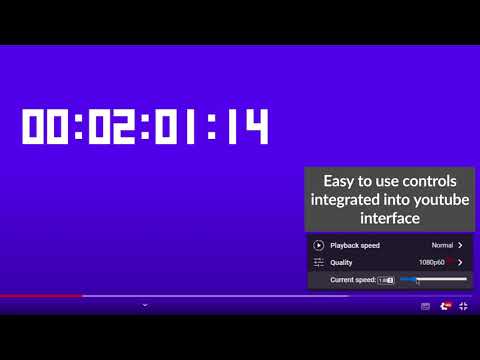
Easy way to change youtube video playback speed
Chrome extension that enables changing YouTube video playback speed from 0 to 10 with a custom step. The controls are integrated with the YouTube player in the form of: - a draggable bar below the quality option in the player settings, - numeric input - by detecting pressed keys provided by the user (by default '-' or 'a' to subtract and '+' or 'd' to add). New dynamic playback speed control in version 1.6.0! The feature of dynamic video playback speed enables the playback speed to begin at a specified rate and then gradually increase until it reaches the desired rate at the specified duration percentage. It has to be enabled in a settings! Source code: https://github.com/MarekNowak250/Change-youtube-playback-speed-chrome-extension Have any improvement suggestion? You can create an issue here: https://github.com/MarekNowak250/Change-youtube-playback-speed-chrome-extension/issues
4.3 分 (滿分 5 分)7 個評分
詳細資料
- 版本1.6.1
- 已更新2024年7月29日
- 提供者PH03NIX Software
- 大小179KiB
- 語言English
- 開發人員
電子郵件
AndrzejKrzakuKrzakowski@gmail.com - 非交易商這位開發人員並未表明自己是交易商。歐盟地區的消費者請注意,消費者權利不適用於你和這位開發人員之間簽訂的合約。
隱私權

這位開發者就你的資料做出下列聲明:
- 除經核准的用途外,不會將你的資料販售給第三方
- 不會基於與商品核心功能無關的目的,使用或轉移資料
- 不會為了確認信用度或基於貸款目的,使用或轉移資料
支援
如有疑問或建議,請使用電腦版瀏覽器開啟這個頁面