

Pinpoint: Screen Annotation & Comments for Video Calls

Overview
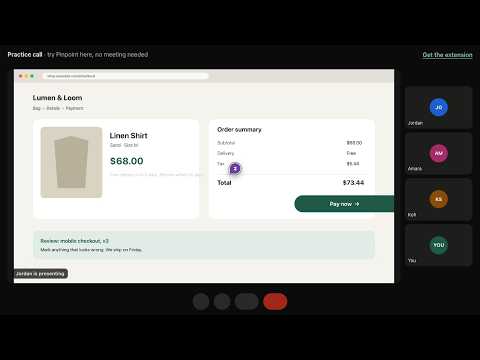
Mark any area of a shared screen in Google Meet, Zoom or Teams, comment on it together, and save a screenshot with the comments.
Point at it. Talk about it. Keep it. No, the button on the left… lower… there." Pinpoint ends that. Mark any part of a shared screen in your video call, write a comment right where you point, and everyone in the call sees it instantly. Every comment keeps a screenshot of the whole workspace, drawings included, with the area outlined and the comments on it, so nothing gets lost after the call.
0 out of 5No ratings
Details
- Version1.2.0
- UpdatedOctober 4, 2026
- Offered byBryan Temple
- Size99.83KiB
- LanguagesEnglish
- Developer
Email
bryantemple.inc@gmail.com - Non-traderThis developer has not identified itself as a trader. For consumers in the European Union, please note that consumer rights do not apply to contracts between you and this developer.
Privacy

Pinpoint: Screen Annotation & Comments for Video Calls has disclosed the following information regarding the collection and usage of your data. More detailed information can be found in the developer's privacy policy.
Pinpoint: Screen Annotation & Comments for Video Calls handles the following:
This developer declares that your data is
- Not being sold to third parties, outside of the approved use cases
- Not being used or transferred for purposes that are unrelated to the item's core functionality
- Not being used or transferred to determine creditworthiness or for lending purposes
Support
For help with questions, suggestions, or problems, please open this page on your desktop browser