

IQ-Optimizer

Overview
TradingView Parameter Optimizer as an extension
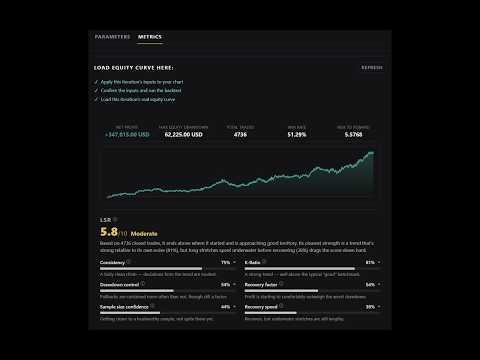
IQ-Optimizer, by ImpulseQuant 📈 A parameter optimizer for TradingView Pine Script strategies. Run your strategy across every combination of the inputs you choose, rank the results, and keep a full report of each run. 🚀 QUICK START 1. Open TradingView and load a chart with your strategy applied. 2. Click the IQ-Optimizer icon to open the popup. 3. Run Prep Scan to detect your inputs and their valid ranges. 4. Set a start, end, and step size for each parameter, then click Optimize. The extension prompts you for anything else it needs along the way. ✨ FEATURES 🎛️ Multi-Parameter Optimization Define ranges across several inputs at once and run the full grid. 🔍 Prep Scan Reads your strategy's numeric inputs and their allowed minimum, maximum, and step values before you start, so you are not guessing at what is valid. 🔢 Live Iteration Count Shows exactly how many runs your ranges will produce, before you commit to them. 💾 Reports Kept On Your Machine Every optimization is saved locally, sortable, and removable at any time from the Reports tab. Nothing is uploaded. 📈 Real Equity Curve Pulled live from TradingView's Strategy Tester, not redrawn from summary numbers. Zoom, pan, and hover any point to see the running metrics as of that trade. 🏅 Long-Term Sustainability Rating A 0 to 10 score built from six measures: consistency, drawdown control, sample size confidence, K-Ratio, recovery factor, and recovery speed. Each one expands to explain what it found. ⚡ Apply To Chart Send any result's parameters straight back to your strategy in one click. 🎯 Deep Backtesting Mode Full accuracy on Entire History runs, or switch it off for faster iteration on shorter test periods. 📥 Downloadable Reports Export any report to keep or share. 📋 REQUIREMENTS A TradingView account with a strategy open on your chart, and an active ImpulseQuant subscription. You enter your license key once inside the extension. ⚠️ DISCLAIMER IQ-Optimizer is an independent tool built by ImpulseQuant. We are not affiliated with, endorsed by, or sponsored by TradingView. TradingView is a trademark of its respective owner. IQ-Optimizer is provided as is, without warranty of any kind. Backtest results describe past performance on historical data and are not a prediction of future results. We do not guarantee any outcome, and nothing in this extension is financial advice. You are responsible for your own trading decisions.
0 out of 5No ratings
Details
- Version1.4.9
- UpdatedSeptember 3, 2026
- FeaturesOffers in-app purchases
- Offered byImpulseQuant
- Size670KiB
- LanguagesEnglish (United States)
- Developer
Email
support@impulsequant.com - Non-traderThis developer has not identified itself as a trader. For consumers in the European Union, please note that consumer rights do not apply to contracts between you and this developer.
Privacy

IQ-Optimizer has disclosed the following information regarding the collection and usage of your data. More detailed information can be found in the developer's privacy policy.
IQ-Optimizer handles the following:
This developer declares that your data is
- Not being sold to third parties, outside of the approved use cases
- Not being used or transferred for purposes that are unrelated to the item's core functionality
- Not being used or transferred to determine creditworthiness or for lending purposes