


Overview
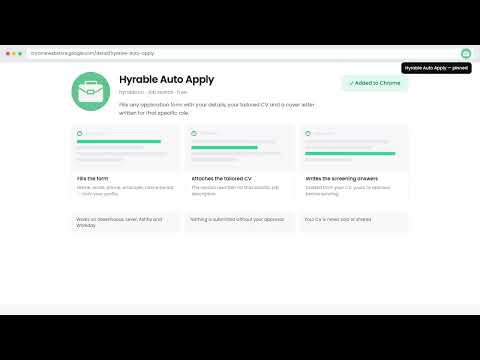
Autofill job applications with your Hyrable-tailored CV, cover letter and answers. You review every field and submit.
Hyrable autofills job applications with your tailored CV, cover letter, and AI-generated screening answers - so you spend less time copy-pasting and more time applying. HOW IT WORKS Connect the extension to your Hyrable account with a one-time pairing code. Hyrable prepares a tailored version of your CV and generates answers to screening questions for each job you want to apply to. When you land on an application page, click the Hyrable icon and hit Autofill. The extension fills in your name, contact details, CV upload, cover letter, and screening question answers in seconds. You review every field, make any edits you like, and click Submit yourself - the extension never submits on your behalf. CORE FEATURES 1. APPLICATION AUTOFILL Automatically detects candidate application forms on corporate career pages. Fills candidate contact info, uploads your tailored resume PDF, writes your cover letter, and populates screening questions. Works across major applicant tracking systems and company portals. 2. JOB BOARD PIPELINE CHIP When browsing career listings on supported job search portals, a lightweight overlay chip appears. Save any position directly to your Hyrable pipeline to generate tailored materials before navigating to the employer's application form. WHAT GETS FILLED • First name, last name, email, phone • CV / resume (uploaded as a PDF) • Cover letter • Portfolio and professional profile links • Notice period, work authorization, salary expectations • Screening questions - answered using your own CV, cover letter, and STAR stories • Work authorization and sponsorship status • Equal opportunity sections - filled only from data you voluntarily provide in your profile ACCURACY & CONTROL All answers are generated strictly from your own CV, cover letter, and pre-written experience. Hyrable does not fabricate qualifications or invent employment history. You remain in full control and review all fields before submitting. PRIVACY & SECURITY • Activates only on supported job application and career listing pages. • Stores your pairing key in Chrome's encrypted sync storage. • No CV text or personal data is stored locally within the browser. • Executes no remotely hosted code - all extension logic is bundled locally. • Does not sell user data or share data with third parties. Full privacy policy: https://hyrable.co/legal/extension-privacy REQUIREMENTS Requires an account at hyrable.co. The autofill feature requires your CV and job preferences to be set up in your profile.
5 out of 51 rating
Details
- Version1.0.9
- UpdatedOctober 28, 2026
- Size132KiB
- LanguagesEnglish
- DeveloperWebsite
Email
contact@hyrable.co - Non-traderThis developer has not identified itself as a trader. For consumers in the European Union, please note that consumer rights do not apply to contracts between you and this developer.
Privacy

Hyrable - Autofill Applications has disclosed the following information regarding the collection and usage of your data. More detailed information can be found in the developer's privacy policy.
Hyrable - Autofill Applications handles the following:
This developer declares that your data is
- Not being sold to third parties, outside of the approved use cases
- Not being used or transferred for purposes that are unrelated to the item's core functionality
- Not being used or transferred to determine creditworthiness or for lending purposes
Support
For help with questions, suggestions, or problems, visit the developer's support site