

GitHub Resizer

Overview
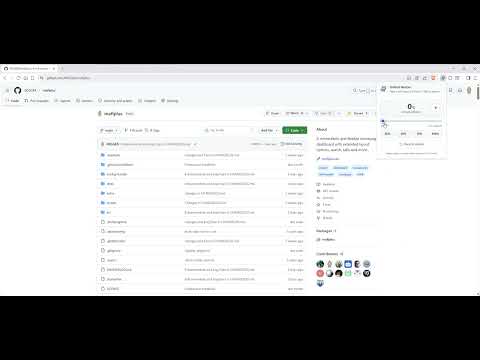
Widen GitHub pages between the native 1280px default and the full viewport, in 1% steps.
GitHub Resizer puts a slider in your Chrome's toolbar that lets you choose **exactly how wide** GitHub pages should be - anywhere between GitHub's native 1280 px layout and the full width of your browser window, in 1 % steps. Most "wide GitHub" extensions are an on/off switch: either you get the default narrow layout, or you get the full screen. GitHub Resizer answers a different question: *how wide?* Pick 25 % for a comfortable reading width on a 4K monitor, 50 % on an ultrawide so code blocks stay readable, or 100 % to fill the entire screen. **Features** - Smooth slider from 0 % (default GitHub) to 100 % (full viewport) in 1 % steps. - Quick presets: 25 %, 50 %, 75 %, 100 %. - Live updates - your setting is applied to every open GitHub tab instantly, without a page reload. - Cross-device sync - your chosen width follows you to other computers via your Firefox account (`storage.sync`), with a local fallback. - Safe on small screens - on viewports up to 1280 px the extension does nothing, so GitHub looks identical to its default layout. - Works on modern GitHub - also widens the inner content column on the new Primer-based GitHub pages, so the page doesn't end up wide-on-the-outside but narrow-in-the-middle. - Keeps READMEs and other markdown content responsive instead of capping them at a fixed width. **Where it works** - `github.com` (repos, pull requests, issues, code view, README, etc.) - `gist.github.com` GitHub Enterprise and custom-domain GitHub installs are not currently supported.
0 out of 5No ratings
Details
- Version1.0.0
- UpdatedJune 15, 2026
- Size26.46KiB
- LanguagesEnglish
- Developer
Email
apps@hibbit.cloud - Non-traderThis developer has not identified itself as a trader. For consumers in the European Union, please note that consumer rights do not apply to contracts between you and this developer.
Privacy

This developer declares that your data is
- Not being sold to third parties, outside of the approved use cases
- Not being used or transferred for purposes that are unrelated to the item's core functionality
- Not being used or transferred to determine creditworthiness or for lending purposes
Support
For help with questions, suggestions, or problems, visit the developer's support site