


Overview
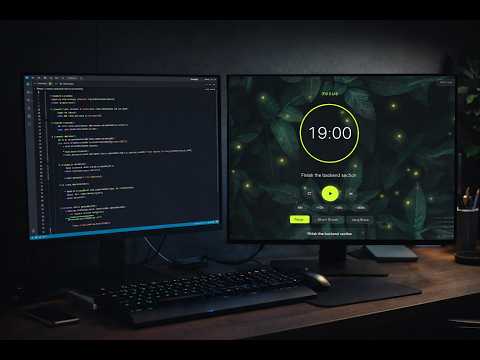
A minimalist, floating Pomodoro focus timer that stays visible across all tabs.
MINTRA — Pomodoro Timer for Focus & Productivity Stay focused and productive with MINTRA, the ultimate Pomodoro timer extension with a floating overlay that follows you across every tab. Perfect for students, remote workers, and anyone serious about deep work. ━━━ WHY CHOOSE MINTRA? ━━━ Unlike typical timer extensions that disappear when you switch tabs, MINTRA's always-visible floating timer stays with you everywhere—on YouTube, Google Docs, social media, coding platforms, and more. Focus better. Work smarter. Track your progress. ━━━ KEY FEATURES ━━━ ⏱️ POMODORO TECHNIQUE TIMER - Focus, Short Break & Long Break modes—fully customizable down to the second - Auto-start breaks and focus sessions for uninterrupted workflow - Quick-add buttons (+30s, +1m, +5m) to extend sessions effortlessly - Timer persists across browser restarts—never lose your progress 👁️ FLOATING OVERLAY — ALWAYS VISIBLE - Sleek, draggable timer widget visible on every website - Auto-dims while typing so it never blocks your view - Compact mode for minimal screen footprint - Adjustable opacity (20%–100%) - Light & dark theme toggle 🖥️ FULLSCREEN IMMERSIVE MODE - Distraction-free fullscreen timer with ambient backgrounds - 2 timer styles: Ring (circular progress) or Digital - 7 ambient themes: Midnight, Forest, Ocean, Void, Charcoal, Wine, and more - 6 animated particle backgrounds: Stars, Fireflies, Aurora, Geometric, Rain, Snow - Perfect for studying, meditation, or deep focus sessions 🎨 BEAUTIFUL THEMES & CUSTOMIZATION - 8 accent color themes: Indigo, Emerald, Rose, Amber, Cyan, Violet, Slate, Lime - Instant theme preview—no reload required - Matches your workflow and personal style 🔔 SMART NOTIFICATIONS & SOUNDS - Desktop notifications when sessions complete - 5 built-in alarm sounds: Bell, Chime, Gong, Digital, Soft - Optional sound loop—alarm repeats until dismissed - Countdown tick for the last 10 seconds - Test sounds before you commit 📝 SESSION TRACKING & HISTORY - Automatic logging of every focus session with timestamps - Name your sessions (e.g., "Study Biology", "Write Report") - Filter by Today, Last 7 Days, or All Time - Search past sessions by task name - "Run Again" button—recreate any session in one click - Stores up to 1,000 sessions locally 📋 TEMPLATES FOR QUICK START - Save your favorite timer configurations as reusable templates - One-click access to your top 3 templates - Perfect for recurring tasks like "Morning Deep Work" or "Study Sprint" 🎊 CELEBRATIONS & MOTIVATION - Confetti animation when you complete a session - Fullscreen celebration screen for major milestones - Optional task completion prompt to recap your work 💾 DATA BACKUP & PORTABILITY - Export all data (history, settings, templates) as JSON - Import from backup to restore or move across devices - Never lose your productivity data ⌨️ KEYBOARD SHORTCUTS (Fully Customizable) - Alt+Shift+S → Start/Pause - Alt+Shift+R → Reset - Alt+Shift+N → Skip to Next Phase - Alt+Shift+H → Toggle Overlay Visibility 🔒 100% PRIVATE — YOUR DATA STAYS YOURS - All data stored locally in your browser - Zero tracking, zero analytics, zero cloud sync - No account required—install and start focusing immediately - Optional privacy mode hides task names from history - No external API calls—works completely offline 🌐 SITE-SPECIFIC RULES - Hide overlay on distracting sites (Netflix, Twitter, YouTube) - Or show only on productive sites (Google Docs, Notion, ClickUp) - Full control over where your timer appears ━━━ PERFECT FOR ━━━ ✅ Students who need a study timer with session tracking ✅ Remote workers managing time across multiple projects ✅ Freelancers tracking billable focus hours ✅ Writers, designers, and creators fighting distractions ✅ Anyone practicing deep work or time-blocking ✅ ADHD-friendly productivity—visual cues help maintain focus ━━━ PERMISSIONS EXPLAINED ━━━ - Storage — Save settings, history, and timer state locally - Alarms — Accurate, drift-free timing in background tabs - Notifications — Alert you when sessions complete - All URLs — Display the floating overlay on any website ━━━━━━━━━━━━━━━━━━━━━ MINTRA is built for people who take their focus seriously. No bloat, no subscriptions, no data harvesting—just a beautifully crafted timer that works. Start your first focused session today. Install MINTRA and reclaim your productivity.
5 out of 51 rating
Details
- Version1.0.0
- UpdatedFebruary 18, 2026
- Size309KiB
- LanguagesEnglish
- DeveloperWebsite
Email
kojakeugenio@gmail.com - Non-traderThis developer has not identified itself as a trader. For consumers in the European Union, please note that consumer rights do not apply to contracts between you and this developer.
Privacy

This developer declares that your data is
- Not being sold to third parties, outside of the approved use cases
- Not being used or transferred for purposes that are unrelated to the item's core functionality
- Not being used or transferred to determine creditworthiness or for lending purposes