

Minimap
1 rating
)
Overview
Navigate, capture, annotate, and organize long web pages with a private local-first Minimap and optional on-device OCR.
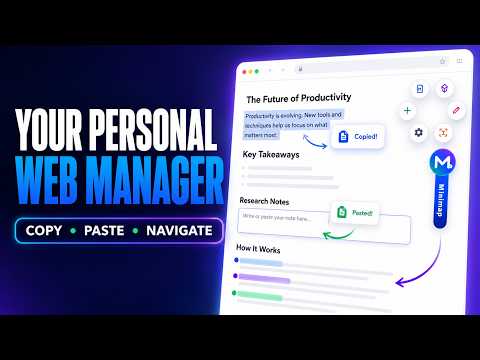
Minimap – Smart Navigation & Productivity Sidebar 🧭 Long webpages shouldn’t feel like a maze. Minimap is your personal web manager—a fast, private, and local-first browser extension that helps you navigate long pages, capture useful information, take notes, and stay organized without constantly switching tabs. The interactive Minimap detects important page sections, highlights your current location, displays reading progress, and lets you jump directly to headings, cards, messages, and other meaningful content without endless scrolling. Select text on any supported webpage to quickly copy it, edit it in Markdown, save it as a note, or paste it into an input field. Quick Tools keep notes, captures, Obsidian, OCR, drawing, and other everyday actions within easy reach. ✨ KEY FEATURES 🧭 Smart Page Navigation Automatically detect important sections and jump between them with one click. 📍 Reading Progress See your current location and reading progress while moving through long content. ✂️ Copy, Edit & Paste Select text to copy it instantly, edit it in Markdown, save it, or paste it into supported input fields. 📌 Quick Capture Save selected text, links, ideas, research, and tasks without leaving the webpage. 🔎 Searchable Notebooks Organize saved captures in nested notebooks and quickly find useful information later. 📝 Markdown Editor Write, format, preview, copy, and save Markdown notes using the built-in editor. 💎 Obsidian-Compatible Workspace Connect a compatible local folder and save your notes inside an existing Obsidian vault. 📸 Page Capture Capture visible areas or full webpages and save them as PNG files. 🎨 Draw & Annotate Use pens, markers, shapes, and arrows to explain or highlight information directly on a live webpage. 🔤 On-Device OCR Select an area of the screen and extract its text locally. Images and extracted text are not sent to an external server. ⚙️ Customizable Experience Adjust Minimap’s position, appearance, edge behavior, opening method, and Quick Tools to match your workflow. 🔐 PRIVATE AND LOCAL-FIRST Your information stays on your device. Minimap stores your saved captures, notes, preferences, and workspace data locally on your device by default. It does not send your browsing data or saved content to external servers. Screenshot access is used only when you explicitly request a capture. OCR processing runs on your device. ✓ No data collection ✓ No analytics ✓ No advertising ✓ Local storage by default ✓ Optional permissions used only when requested 💡 OPTIONAL OBSIDIAN SUPPORT For an enhanced knowledge-management experience, you can use Minimap with Obsidian—a free note-taking application. Connect an Obsidian-compatible local folder to keep your browser notes inside your existing knowledge vault. Whether you’re researching, studying, writing, reading long conversations, or managing daily tasks, Minimap keeps your essential browser tools right beside you. Copy. Paste. Capture. Take notes. Navigate—all from one convenient sidebar.
5 out of 51 rating
Details
- Version1.1.1
- UpdatedAugust 17, 2026
- Offered byKushagra Singh
- Size10.17MiB
- LanguagesEnglish
- DeveloperKushagra Singh
BTM 1st stage Banglore, Karnataka 560068 INEmail
kushagrasingh2027@gmail.com - Non-traderThis developer has not identified itself as a trader. For consumers in the European Union, please note that consumer rights do not apply to contracts between you and this developer.
Privacy

This developer declares that your data is
- Not being sold to third parties, outside of the approved use cases
- Not being used or transferred for purposes that are unrelated to the item's core functionality
- Not being used or transferred to determine creditworthiness or for lending purposes
Support
For help with questions, suggestions, or problems, please open this page on your desktop browser