


總覽
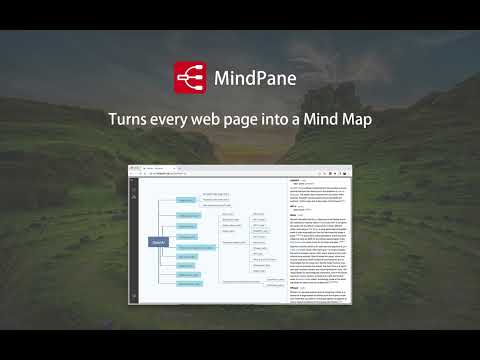
Turn any web page into a mind map with clean, distraction-free reading mode
Welcome to MindPane, your ultimate tool for transforming the way you read and navigate web content. Designed as a Chrome extension, MindPane takes any web page you are reading and visualizes it as an interactive Mind Map. With this innovative approach, you can quickly grasp the main structure of a document, explore key topics, and jump between sections with ease. * Pleasantly read the document in a Mind Map * Ads are eliminated in the Mind Map * 16 Mind Map themes can be chosen * 8 Mind Map Layouts can be chosen * Export the Mind Map as a high quality PNG image ## Why MindPane? In today's fast-paced digital world, skimming and comprehending web content efficiently is more important than ever. Traditional methods of reading through long articles or reports can be time-consuming and often lead to missed details. MindPane changes this by offering: - Instant Visualization: Get a clear and concise Mind Map of the web page content, so you can understand its structure at a glance. - Easy Navigation: Jump seamlessly between topics and sections without losing your place or focus. - Enhanced Retention: Visually organized content helps improve information retention and comprehension. - User-Friendly Interface: A clean and intuitive design that makes browsing content effortless and enjoyable. ## Who Is It For? MindPane is perfect for: - Researchers and Students: Quickly gather insights from academic articles or long papers. - Professionals: Speed up your workflow by navigating complex reports or documentation with ease. - Avid Readers: Enhance your reading experience with a better overview of articles and blogs. ## How to use After installing this extension, pin the MindPane extension to the browser toolbar. According to the rules of the Extensions Store, extension can not work on the store pages and home page. Please open any other article pages (for example, https://en.wikipedia.org/wiki/OpenAI) after installing this extension and click the MindPane icon from the browser toolbar to check how the extension will work on it. ## 16 Mind Map themes - Business Blue - Cherry Party - Colorful Clear - Colorful Fancy - Concise Blue - Deep Forest - Distinctive - Fresh - Green Ray - Monochrome - Navigator - Pragmatic - Robotic - Romantic - Simplified - Silent Night ## 8 Mind Map layouts - Clockwise - Anti-clockwise - Left to Right - Right to Left - Downward - Upward - Leftward - Rightward ## Feedback Thanks for checking out MindPane - we'd really love to know your impression about this Chrome extension. Please don't hesitate to let us know your thoughts and suggestions! Community: https://discord.gg/3Bbcd3yZNq Email: support@documentnode.io X (Twitter): @document_node (https://x.com/document_node) ## Changelog All notable changes to this extension will be documented in this section. ### Version 1.3.3 - Improved options page accessibility by opening it in a new tab instead of inline popup - Made host permissions optional for floating icon feature - Disabled floating icon by default for better privacy ### Version 1.3.2 - Implemented a new floating icon on each page - Implemented a new context menu item: "Show/Hide MindPane" - Added new options to toggle the floating icon and context menu item - Improved the styles of the welcome page - Miscellaneous bug fixes and improvements ### Version 1.3.1 - Improved compatibility to support a wider range of web pages - Enhanced app view and title bar styling - Improved parsing and display of article content for better readability - Refined article page styling for PDF export and printing - Added an Options page to configure user preferences ### Version 1.3.0 - Rewrote the Mind Map renderer to improve performance and reliability. - Added the ability to expand/collapse nodes in the Mind Map. - Made it more robust and consistent across different web pages. - Other bug fixes and improvements. ### Version 1.2.1 - Enhanced styling of preview content for better readability and presentation. - Resolved issues with jump links, ensuring smoother navigation and link accuracy. ### Version 1.2.0 - Enhanced the reliability of content parsing and display from web pages. - Resolved issues to ensure the preview and Mind Map reload each time the extension icon is clicked, capturing the latest content even after navigating to a different page. ### Version 1.1.0 - Added print support for preview content - Fixed bookmark links issue for some websites - Improved Mind Map text drawing algorithm ### Version 1.0.4 - Improved the design of interaction between extension and web page - Fixed code block display issue in the preview area ### Version 1.0.3 - Improved preview layout by not showing elements with empty text content ### Version 1.0.2 - Fixed issues of show Mind Map on Sentry documentation pages and Github gist ### Version 1.0.1 - Save user preferences of theme, layout, and splitter position - Added a Discord community link on the sidebar ### Version 1.0.0 - Initial release including basic features
4.6 分 (滿分 5 分)11 個評分
詳細資料
隱私權

這位開發者就你的資料做出下列聲明:
- 除經核准的用途外,不會將你的資料販售給第三方
- 不會基於與商品核心功能無關的目的,使用或轉移資料
- 不會為了確認信用度或基於貸款目的,使用或轉移資料
支援
如有疑問或建議,請使用電腦版瀏覽器開啟這個頁面