

MindMap Tab

Tổng quan
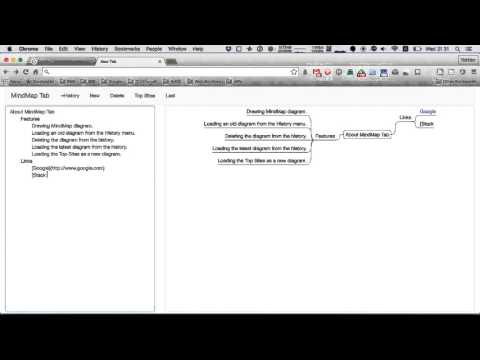
Keep your idea by drawing MindMap quickly.
Note: If this extension can't be opened, backup your data and reinstall this extension. This extension provides you with drawing MindMap in Chrome. Each MindMap is stored to your local storage automatically, and you can open the old MindMap diagram quickly. The "Calendar View" feature has been released from the version 3. If your mindmap has some "YYYY/MM/DD" or "YYYY/MM" format items, they are rendered as an event on the Calendar View dialog. Since the version 2, you can store MindMaps into the Firebase Database. If you are interested in this feature, click the menu "Login" on the header menu (first, you need to create your new account). History: Oct 22, 2019: Release 3.3.0. Show the last opened MindMap at startup. Apr 24, 2019: Release 3.2.0. Added a new feature to show how to use guide. Apr 8, 2019: Release 3.1.0. Added a new feature to change Mindmap diagram layout. Feb 4, 2019: Release 3.0.2. Fix style bugs. Dec 19, 2018: Released 3.0.1. Added a new feature "Calendar View". Nov 29, 2018: Released 2.17.1. Added status bar and buttons to change layout, and restructured menus. Sep 3, 2018: Released 2.16.0. Revert the 2.15.0. Sep 3, 2018: Released 2.15.0. Cache static files by the ServiceWorker. May 12, 2018: Released 2.14.0. Open a link by a new window when a shift key clicked. May 11, 2018: Released 2.13.0. Reorganize the menu, and add a new feature to show/hide strike through texts. Apr 5, 2018: Released 2.12.0. Support indents with 4 white spaces. Apr 3, 2018: Released 2.11.3. Support as PWA. Mar 31, 2018: Released 2.11.2. Update the Bootstrap version to 4.0.0. Mar 28, 2018: Released 2.11.1. Fix two bugs about Copy and Export features. Mar 16, 2018: Released 2.11.0. Add two menus to format a selected text. Dec 27, 2017: Released 2.10.1. Fix the MindMap vertical position problem. Dec 27, 2017: Released 2.10.0. Add a new feature to change a font size of the MindMap. Dec 25, 2017: Released 2.9.0. Can turn on/off a line color. Dec 23, 2017: Released 2.8.0. Add bold/strikethrough text styles. Dec 23, 2017: Released 2.7.1. Fix a bug about the history dropdown list. Dec 3, 2017: Released 2.7.0. Abolish override a new tab. Instead, provide a browser action. Nov 28, 2017: Released 2.6.2. Fix some bugs about calculating a node length. Feb 23, 2017: Released 2.6.1. Adjust save timing. Feb 20, 2017: Released 2.6.0. Support to move the Canvas with DnD. Feb 17, 2017: Released 2.5.0. Support to copy as HTML text. Feb 12, 2017: Released 2.4.1. Fix a problem about sync. Feb 8, 2017: Released 2.4.0. Support a layout change. Feb 7, 2017: Released 2.3.0. Use Ace Editor. Feb 6, 2017: Released 2.2.0. When clicking each node, jump to the target position in the textarea. Feb 5, 2017: Released 2.1.0. Support exporting MindMap diagram as a PNG/JPEG image. Feb 4, 2017: Released 2.0.0. Support Firebase Database.
4,0/5146 lượt xếp hạng
Chi tiết
- Phiên bản3.3.2
- Đã cập nhật6 tháng 3, 2025
- Kích thước402KiB
- Ngôn ngữEnglish
- Nhà phát triển
- Người bán phi thương mạiNhà phát triển này không tự nhận mình là người bán. Đối với người tiêu dùng ở Liên minh Châu Âu, xin lưu ý rằng các quyền của người tiêu dùng không được áp dụng trong hợp đồng giữa bạn và nhà phát triển này.
Quyền riêng tư
MindMap Tab đã công bố thông tin sau đây liên quan đến việc thu thập và sử dụng dữ liệu của bạn. Bạn có thể xem thêm thông tin chi tiết trong privacy policy của nhà phát triển.
MindMap Tab xử lý dữ liệu sau:
Nhà phát triển này tuyên bố rằng dữ liệu của bạn
- Không được bán cho bên thứ ba, ngoài những trường hợp sử dụng đã được phê duyệt
- Không được sử dụng hoặc chuyển nhượng cho các mục đích không liên quan đến chức năng chính của mặt hàng
- Không được sử dụng hoặc chuyển nhượng để xác định khả năng thanh toán nợ hoặc phục vụ mục đích cho vay
Hỗ trợ
Nếu bạn có câu hỏi, ý kiến đề xuất hoặc gặp vấn đề, hãy truy cập trang web hỗ trợ của nhà phát triển để được trợ giúp