


Overview
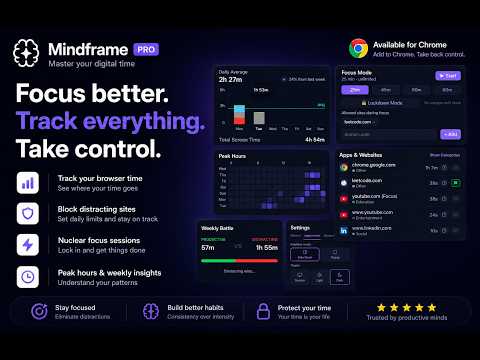
See where your browser time actually goes. Block distracting sites, run focus sessions, and build better habits.
Your screen time is bleeding out — and you don't even notice. You open Chrome to check one thing. Thirty minutes later you're deep in a YouTube rabbit hole, three Reddit threads in, and that task you sat down to do? Untouched. Mindframe makes the invisible visible. ━━━━━━━━━━━━━━━━━━━━━━━━━━ HOW IT WORKS Install → browse normally → open the side panel anytime to see exactly where your hours went. No setup. No account. No cloud sync. Everything stays local on your device. ━━━━━━━━━━━━━━━━━━━━━━━━━━ CORE FEATURES (FREE) • Real-time screen time tracking — per site, per hour, per day • Category breakdowns — Social, Entertainment, Productivity, AI, Education & more • Day & week views with hourly bar charts • 1-hour site alerts — get a nudge when you've been somewhere too long • 7-day history with daily comparisons ━━━━━━━━━━━━━━━━━━━━━━━━━━ PRO FEATURES ($5 one-time, lifetime access) 🎯 FOCUS MODE Run timed focus sessions (25, 45, 60, or 90 min). Choose which sites are allowed — everything else gets blocked. Lockdown Mode means you can't quit early. No cheating. 🔖 YOUTUBE FOCUS TAGGING Not all YouTube is wasted time. Tag specific videos as "Focus" — they get tracked separately under Education instead of Entertainment. Study playlists, tutorials, and lectures finally count as productive. 📊 PEAK HOURS HEATMAP A 7×24 grid showing exactly when you're most active. See your patterns at a glance. ⚔️ WEEKLY BATTLE REPORT Productive vs. Distracting time shown as a scoreboard. Know if you're winning or drifting. 🚨 DRIFT DETECTION Left GitHub and opened Twitter within 5 minutes? Get a gentle notification: "Was that intentional?" — a small friction that breaks autopilot scrolling. ⏱️ COOLDOWN TIMER When a blocked site triggers, you see a 10-second breathing pause before any override option. Just enough time to ask: "Do I actually need this right now?" 🏷️ CUSTOM CATEGORIES & SITE FLAGS Create your own categories. Assign any domain to any category. Flag sites as Focus or Distracting to override automatic classification. 🔒 SITE BLOCKING WITH DAILY LIMITS Set per-site daily time limits. When time's up, the site is blocked across all tabs. Get a 1-minute warning before the limit hits. 📈 FULL HISTORY & TRENDS Unlimited day/week history. Weekly summary notifications. Daily goals with streaks. 📤 DATA EXPORT Export your complete screen time data as JSON anytime. ━━━━━━━━━━━━━━━━━━━━━━━━━━ WHY MINDFRAME? Most screen time tools shame you. Mindframe informs you. • No account required • No cloud — your data stays on your device • No subscriptions — $5 once, yours forever • 7-day free trial of all Pro features • Lightweight — runs silently, uses minimal resources ━━━━━━━━━━━━━━━━━━━━━━━━━━ PRIVACY FIRST Mindframe never reads page content, URLs, or form data. It only knows which hostname is active and for how long. No ads. No data selling. Full privacy policy: https://niranjanakella.com/privacy ━━━━━━━━━━━━━━━━━━━━━━━━━━ Built by Niranjan Akella https://niranjanakella.com
0 out of 5No ratings
Details
- Version0.2.0
- UpdatedMay 15, 2026
- FeaturesOffers in-app purchases
- Size2.9MiB
- LanguagesEnglish
- DeveloperAkella NiranjanWebsite
H.No:10-283/9/1/1, Vasanthapuri Colony, Malkajgiri Hyderabad, Telangana 500047 INEmail
niranjanakella06@gmail.comPhone
+91 96522 48895 - TraderThis developer has identified itself as a trader per the definition from the European Union and committed to only offer products or services that comply with EU laws.
Privacy

Mindframe — Screen Time Tracker & Focus has disclosed the following information regarding the collection and usage of your data. More detailed information can be found in the developer's privacy policy.
Mindframe — Screen Time Tracker & Focus handles the following:
This developer declares that your data is
- Not being sold to third parties, outside of the approved use cases
- Not being used or transferred for purposes that are unrelated to the item's core functionality
- Not being used or transferred to determine creditworthiness or for lending purposes
Support
For help with questions, suggestions, or problems, please open this page on your desktop browser