Item logo image for Midnight Lizard

Midnight Lizard

midnight-lizard.org
4.7(

810 ratings

)
Item video thumbnail

Overview

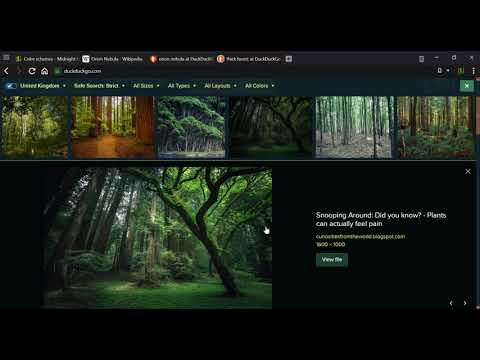
Custom color schemes for all websites: night mode, dark themes, blue light filter, screen shader, high contrast, grayscale, etc.

Midnight Lizard color schemes work across all websites. There are many predefined color schemes and you can install more from midnight-lizard.org ✔ Choose between dark, light, grayscale or colorful color schemes ✔ Modify existing or create new color schemes ✔ Use different color schemes on each website ✔ Adjust brightness, saturation, contrast and hues ✔ Improve accessibility and readability ✔ Increase contrast to make text easier to read ✔ Apply blue light filter to shift all colors towards red light ✔ Keep original images and hues without inversion ✔ Schedule automatic activation and deactivation ✔ Use keyboard shortcuts to toggle extension ⮚ on current website: Alt+Shift+L ⮚ globally: Alt+Shift+M ✔ Use with PDF and local files (enable in browser settings) ✔ Shade bright colors and images ✔ Change any colour you want ✔ Synchronize your settings ✔ Configure background, text, buttons, links, borders, images and scrollbars ✔ Apply globally, per-website or with url match patterns ✔ Switch between websites blacklist and whitelist modes ✔ Use Simplified mode to improve performance on heavy websites ✔ Contribute to our open source project on GitHub.com/Midnight-Lizard ✔ Donate to our OpenCollective.com/Midnight-Lizard Please use browser themes in order to style New Tab page, tabs and toolbars - extensions cannot do that. Also extensions don't work on New Tab page, Chrome Web Store and browser settings.

Details

  • Version
    11.0.0
  • Updated
    January 2, 2026
  • Size
    1.03MiB
  • Languages
    51 languages
  • Developer
    Website
    Email
    support@midnight-lizard.org
  • Non-trader
    This developer has not identified itself as a trader. For consumers in the European Union, please note that consumer rights do not apply to contracts between you and this developer.

Privacy

Manage extensions and learn how they're being used in your organization
The developer has disclosed that it will not collect or use your data. To learn more, see the developer’s privacy policy.

This developer declares that your data is

  • Not being sold to third parties, outside of the approved use cases
  • Not being used or transferred for purposes that are unrelated to the item's core functionality
  • Not being used or transferred to determine creditworthiness or for lending purposes

Support

Related

Night Shift

4.5

Night Shift automatically shifts the colors of your browser content to the warmer end of the color spectrum after dark.

Dark mode / night reader

4.2

Inverts page colors, showing white text on a dark background

Color Changer

3.9

Change a page's text, background, and link colors to your liking.

Night shift mode

4.7

Take care of your eyes. Change screen brightness to special eye-protective colors from the list or to a color that you prefer.

Dark Mode

4.4

Dark Mode, read at night. Bluelight filter for every website. Relax your eyes at night and day.

Screen Shader | Smart Screen Tinting

4.5

Shades Chrome to a soothing orange color to decrease eye-strain, eye fatigue and to appease your brain's day/night cycle.

Extensity

4.8

Quickly enable/disable Google Chrome extensions

Custom Dark Mode

3.8

Customize your dark mode for the web!

Dark mode - Dark theme

4.5

Universal Dark Mode: Optimize eye comfort for day and night web browsing with our user-friendly dark theme for all websites.

Dark Night Mode

4.2

It is a night mode for the entire Internet. It darkens all the websites you visit so that you can browse without straining your eyes

Ultra Button

4.6

A button for everything.

Color Temperature (Change Lux)

3.8

A lite and easy-to-use addon that adjusts the screen color to match the environment!

Night Shift

4.5

Night Shift automatically shifts the colors of your browser content to the warmer end of the color spectrum after dark.

Dark mode / night reader

4.2

Inverts page colors, showing white text on a dark background

Color Changer

3.9

Change a page's text, background, and link colors to your liking.

Night shift mode

4.7

Take care of your eyes. Change screen brightness to special eye-protective colors from the list or to a color that you prefer.

Dark Mode

4.4

Dark Mode, read at night. Bluelight filter for every website. Relax your eyes at night and day.

Screen Shader | Smart Screen Tinting

4.5

Shades Chrome to a soothing orange color to decrease eye-strain, eye fatigue and to appease your brain's day/night cycle.

Extensity

4.8

Quickly enable/disable Google Chrome extensions

Custom Dark Mode

3.8

Customize your dark mode for the web!

Google apps