


Overview
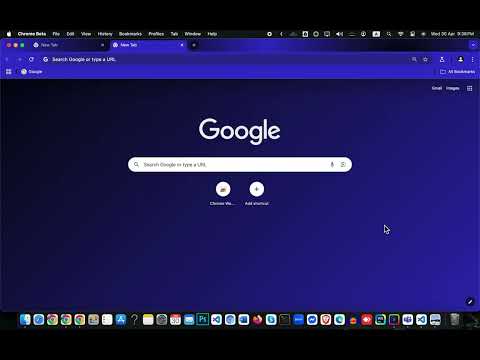
A dark, modern blue theme with gradient NTP
Midnight Blue Professional by Masum Ahmed is a sophisticated Chrome theme tailored for high-performance individuals who demand both aesthetics and functionality in their digital workspace. Crafted with precision, this theme embodies the essence of modern professionalism with a rich, dark navy-blue frame (rgb(10, 26, 47)) that brings calm, clarity, and focus to your daily browsing experience. Whether you're a software developer, entrepreneur, business strategist, digital creator, or remote worker, this theme was designed with you in mind. 🎯 Why Professionals Love This Theme: ✅ Minimal Yet Powerful Design: The clean lines and dark palette create a distraction-free environment that allows your work to shine. ✅ Readable Contrast: Tabs and text stand out clearly with white tab text and light gray inactive tabs, making multitasking across dozens of tabs seamless and intuitive. ✅ Elegant Bookmark Highlights: Bookmarks appear in a polished white ([255, 255, 255]), ensuring important links are always visible without overwhelming the interface. ✅ Sleek Toolbar Icons & Buttons: Toolbar icons and buttons blend into the theme while remaining easy to find, thanks to thoughtful white-on-dark contrast. ✅ Custom Gradient New Tab Background: The NTP (new tab page) features a custom center-aligned gradient image that gives a visual boost without distracting from your primary focus. It does not repeat, maintaining a consistent look across devices. ✅ Compatible with Dark Mode: Harmonizes beautifully with system-wide dark themes on Windows, macOS, and Linux for a unified aesthetic across your apps. ⚙️ Theme Highlights: Frame Color: Deep navy blue for a grounded, professional look Tab Text: Clear white for high visibility Bookmark Text: Soft white with subtle elegance New Tab Background: Sleek black with a modern, center-aligned gradient Button Background: Clean white buttons over dark UI for clarity and style Toolbar Icon Color: Crisp white icons that pop without distraction 👨💻 Designed by a Professional for Professionals: Masum Ahmed, a full-stack developer and designer, created this theme to reflect the real-world needs of today’s productivity-driven users. This isn't just a "dark theme"—it's a carefully balanced workspace that merges form and function to keep you productive day and night. Whether you're: Debugging code at midnight Managing spreadsheets and CRM dashboards Browsing research and data reports Leading virtual meetings and projects Or simply enjoying a cleaner, more focused browser experience... Midnight Blue Professional helps you stay centered, sharp, and in control. 🛠️ Built with care. Designed to last. Ready for work. Elevate your Chrome experience with Midnight Blue Professional by Masum Ahmed—where productivity meets elegance.
5 out of 52 ratings
Details
- Version1.0
- UpdatedMay 1, 2025
- Size309KiB
- LanguagesEnglish
- DeveloperMasum AhmedWebsite
Road-21, Sector-11, Uttara, Dhaka-1230, Bangladesh Dhaka 1230 BDEmail
mail@masum.uk - Non-traderThis developer has not identified itself as a trader. For consumers in the European Union, please note that consumer rights do not apply to contracts between you and this developer.
Support
For help with questions, suggestions, or problems, please open this page on your desktop browser