


Overview
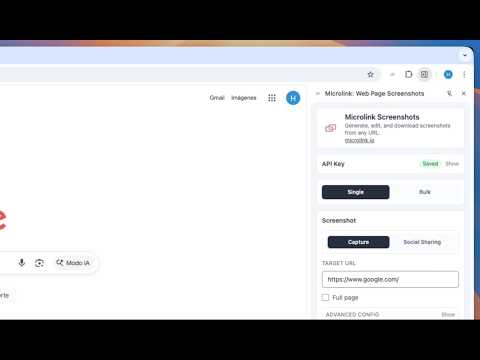
Instantly capture web page screenshots, bulk capture, annotate, and generate shareable images without leaving your browser.
Microlink: Professional Web Screenshots at Scale Stop wasting time with browser extensions that only do half the job. Microlink Screenshots brings industrial-grade web rendering directly to your Chrome Side Panel. Capture one page or fifty in bulk—no tabs, no fluff, just results. 🚀 KILLER FEATURES Bulk Capture (Up to 25 URLs): The only extension that lets you paste a list and download them all as a single ZIP. Track progress in real-time. Social-Ready Frames: Turn a raw screenshot into a beautiful post for X or LinkedIn with one click. Automatic browser frames and gradient backgrounds included. Pixel-Perfect Viewports: Toggle between Desktop, Tablet, and Mobile presets, or define your own custom dimensions. Visual Element Picker: Don't need the whole page? Hover and click to capture specific CSS elements with surgical precision. Built-in Annotation Editor: Draw, add text, arrows, and shapes. Edit your captures before downloading without leaving the browser. Smart History: Access your last 25 captures for 24 hours. Copy to clipboard (PNG), re-edit, or bulk-export whenever you need. 🛠 BUILT FOR YOUR WORKFLOW Developers & QA: Test responsive designs and capture bugs across multiple viewports and specific DOM elements. Marketers & Designers: Create high-quality social media assets and document landing pages instantly. Zero Friction: No account required. No watermarks. No data stored on our servers—your captures are returned directly to you. 📦 HOW IT WORKS Open the Side Panel via the extension icon. Input a URL or use the current tab. Set your viewport and capture mode (Full page, Element, or Social). Generate → Preview, Annotate, or Download. Powered by the Microlink API, the industry standard for reliable web rendering. 🔒 PRIVACY & PERMISSIONS We are 100% transparent about why we need your data: Active Tab / Tabs: To detect the URL you want to capture. Side Panel: To provide a non-intrusive UI that doesn't block your workflow. Scripting: To enable the visual element picker on web pages. Storage: To remember your settings and API key locally. Downloads: To save your screenshots and ZIP files to your computer. 💰 PRICING Free: 25 screenshots per day, no strings attached. Pro: Have a Microlink API key? Plug it into settings to unlock your plan's full potential and higher limits. ——— RESOURCES ——— ▸ Official Website: https://microlink.io/screenshot ▸ Documentation: https://microlink.io/docs ▸ Pricing & Limits: https://microlink.io/#pricing ▸ Support: hello@microlink.io
0 out of 5No ratings
Details
- Version1.0.0
- UpdatedJuly 10, 2026
- Size206KiB
- LanguagesEnglish
- DeveloperJoseba LegarretaWebsite
C. José Antonio Zapata, 6, 3A Madrid, Madrid 28045 ESEmail
hello@microlink.ioPhone
+34 688 63 82 89 - TraderThis developer has identified itself as a trader per the definition from the European Union and committed to only offer products or services that comply with EU laws.
Privacy

This developer declares that your data is
- Not being sold to third parties, outside of the approved use cases
- Not being used or transferred for purposes that are unrelated to the item's core functionality
- Not being used or transferred to determine creditworthiness or for lending purposes
Support
For help with questions, suggestions, or problems, visit the developer's support site