

Plumnote - Notebook

Overview
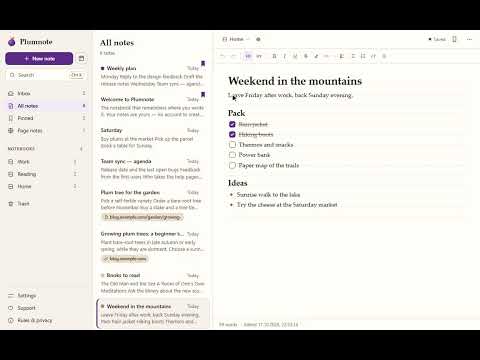
The notebook that remembers where you wrote it. Notes, to-dos and a web clipper. Private by default, free forever.
Formerly "Advanced To-Do List | Notepad" — your old to-dos can be imported on each site where you used them. The notebook that remembers where you wrote it. Write a note on any web page and it waits for you there the next time you visit. Private by default, and free forever. ✍️ Write anywhere — open a floating notebook panel on any website from the Plumnote icon. Drag it, resize it, fold it into a small bubble. 📌 Notes that come back — pin a note to a page or a whole site. When you return, a small bubble shows how many notes are waiting. ✂️ Clip what matters — select text, right-click → Plumnote. The quote is saved with the page title, a clean link and the date. ✅ To-do lists, properly — checklists, headings, lists, quotes, code, highlights and links. Type "/" for blocks or use Markdown shortcuts. 📅 Today — one click opens today's page, with yesterday's unfinished to-dos carried over. 📚 Organised — Inbox, notebooks, pinned notes, colour labels, fast search (Ctrl+K), templates for meetings, reading notes and weekly plans, Trash with 30-day undo. 🔒 Private by design — no Plumnote account, no tracking, no ads. Your notes live in your browser and Plumnote makes no network requests unless you turn on sync. The in-page panel runs in its own secure frame, so websites cannot read what you type. ☁️ Optional sync through your own Google Drive — turn it on in Settings and your notes follow you between computers. They are kept in a hidden folder of your Drive that only Plumnote can open; there is no Plumnote server and the developer never sees your notes. If two computers edit the same note offline, both texts are kept. Off by default; turn it off or delete the cloud copy any time. 💾 Yours to keep — export everything as a backup, drop Markdown or text files in to import them, print a note, or export a single note as Markdown or text. 🌓 Paper & Espresso — a warm paper theme and a dark coffee theme. Plumnote is made by one person and stays free. If it helps you, you can support it from the Support page.
5 out of 51 rating
Details
- Version2.0.1
- UpdatedOctober 20, 2026
- Size363KiB
- LanguagesEnglish
- DeveloperWebsite
Email
autorefreshtasks@gmail.com - Non-traderThis developer has not identified itself as a trader. For consumers in the European Union, please note that consumer rights do not apply to contracts between you and this developer.
Privacy

Plumnote - Notebook has disclosed the following information regarding the collection and usage of your data. More detailed information can be found in the developer's privacy policy.
Plumnote - Notebook handles the following:
This developer declares that your data is
- Not being sold to third parties, outside of the approved use cases
- Not being used or transferred for purposes that are unrelated to the item's core functionality
- Not being used or transferred to determine creditworthiness or for lending purposes
Support
For help with questions, suggestions, or problems, visit the developer's support site