

Unfollow Assistant - Unfollow & Block Non Followers on IG

Overview
Find who doesn't follow you back on Instagram. Review, unfollow or block non-followers from your own browser.
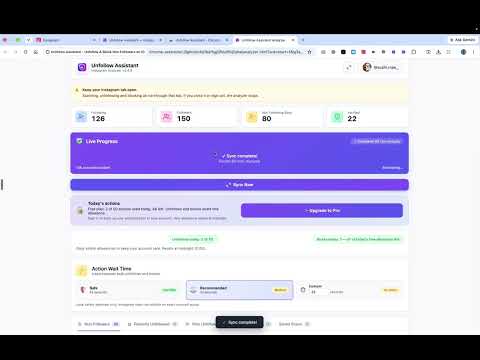
START FREE ✅ NEW FEATURES ADDED: BLOCK NON-FOLLOWERS 🚫 🛡️✨ TAME YOUR FOLLOWING LIST. KEEP THE PEOPLE WHO MATTER. LET GO OF THE REST. ✨🛡️ When you follow hundreds or thousands of accounts, checking manually is frustrating and slow. Unfollow Assistant gives you one organised, distraction-free workspace where you can identify accounts that do not follow you back, review profiles, protect people you want to keep, and manage your following list safely through your browser. No spreadsheets. No copying usernames into notes. No pasting session cookies. No sharing your Instagram password. 🔐 🚀 WHY USE UNFOLLOW ASSISTANT? 👀 See accounts that do not follow you back in one clear, searchable list ⏱️ Save hours compared with manually checking profiles one by one 💜 Protect friends, family, creators, customers, and VIP contacts using Keep 👋 Review and unfollow accounts individually or in reviewed batches 🚫 Block non-followers or unwanted accounts when you need a stronger cleanup option ⏸️ Full Pause, Resume, and Stop controls on active unfollow and block tasks ⚡ Live queue tracking showing who is being processed and who is next in line 📊 See verified, real-time results as Instagram confirms each action 🔁 Compare completed scans to discover exactly who unfollowed you over time 🕘 Save your completed scan history without having to start over 🔎 Search and filter your results by username, name, or verification status 🎛️ Stay in complete control — nothing happens without your confirmation 🔒 Runs directly through the Instagram session already signed in within your browser 🛠️ HOW IT WORKS 1️⃣ Open Instagram in Chrome and sign in normally. 2️⃣ Open Unfollow Assistant from your browser toolbar. 3️⃣ Click Start Analysis. 4️⃣ Keep your Instagram tab open while the extension analyzes your followers and following lists. 5️⃣ Review accounts that do not follow you back. 6️⃣ Choose Keep, Unfollow, or Block for the accounts you want to manage. Your results display usernames, display names, profile avatars (when available), verified badges, follow-back status, and real-time action status. Simple. Transparent. Controlled. ✅ 🔍 SMART SCAN RESULTS Unfollow Assistant provides rich, actionable profile details for every account: 👤 Username and display name 🖼️ Profile picture preview ✔️ Verified account badge 🤝 Follow-back status 💜 Keep protection status ✅ Confirmed unfollow or block results 🔎 Instant search and filtering tools Your most recent complete scan is always preserved. If a scan is ever interrupted by a network blip, your previous complete data remains safe and ready to use. 📡 LIVE SCAN PROGRESS Stay informed every step of the way while your account is being analyzed: 🧭 Current scan stage 🔢 Accounts discovered 👥 Followers and following totals ⏳ Accounts remaining 🕐 Estimated time remaining (ETA) ⏸️ Graceful retry and interruption handling If Instagram temporarily rate-limits or interrupts a request, Unfollow Assistant pauses and retries intelligently while preserving all progress collected so far. An interrupted scan is never passed off as complete, so you always work with authentic data. 💜 KEEP LIST PROTECTION Not every account that doesn't follow you back should be removed. You might follow a close friend, favorite creator, client, coworker, or an account you simply enjoy following. Tap Keep on any profile to shield it from your cleanup lists. Your Keep list can be: 💾 Saved locally on your device ☁️ Backed up to your Unfollow Assistant account when signed in 🔗 Synced across your compatible Chrome browsers 📤 Exported and imported anytime for backup peace of mind Protect the people who matter first, then easily review everyone else. 👋 CONTROLLED UNFOLLOWING & BLOCKING Review before you act. Unfollow Assistant spaces actions apart naturally rather than blasting bulk requests at once: 👋 Unfollow or block accounts individually with one click ☑️ Select multiple reviewed accounts for batch cleanup ⏳ Paced action delays to respect platform pacing ⏸️ Pause, resume, or stop running jobs at any moment 🟢 Live queue indicator showing current progress and next in line 📊 Watch row badges update instantly to "Unfollowed" or "Blocked" 🧮 Clear daily action counters An account is only marked as completed when Instagram has verified and confirmed the action. 📊 WHO UNFOLLOWED ME Track changes to your audience across time. When you complete multiple scans, Unfollow Assistant compares historical follower lists to identify accounts that unfollowed you between scans. Spot audience changes without tedious manual checking. 🕘 SAVED SCAN HISTORY Revisit past completed scans anytime without re-running the entire scan from scratch. Each scan is safely tied to the specific Instagram handle analyzed, ensuring accounts never get mixed up. 🔐 PRIVATE BY DESIGN Unfollow Assistant works exclusively through the Instagram session already authenticated in your browser. ❌ We NEVER ask for your Instagram password. ❌ We NEVER ask you to copy or paste session cookies. ❌ We do NOT use remote headless scrapers to access your account. ❌ We do NOT route your traffic through third-party automation platforms. All Instagram interactions take place locally inside your own browser tab. Optional Unfollow Assistant account sign-in is used solely for subscription status and cloud backup. Your Instagram credentials remain strictly yours. 🔒 ⚙️ BUILT-IN SAFETY CONTROLS & BEST PRACTICES Instagram monitors repetitive account activity. Unfollow Assistant is engineered with built-in protective habits: 🐢 Natural pacing delays between account actions 💡 Recommended batching advice: we recommend working in batches of 30–50 actions, followed by an hour or two break ⏸️ Automatic cooldown pauses if Instagram signals temporary rate limits 🔔 Clear connection and session alerts 🛑 Instant stop controls anytime you want to pause 🩺 Built-in diagnostics for quick troubleshooting No extension can guarantee that Instagram will never apply temporary action restrictions. Always review your selections and manage your account responsibly. 🆓 FREE FOREVER The free plan includes the complete management toolkit: 🔍 Full non-follower and mutual follower analysis 🔎 Complete search, sorting, and filtering 💜 Local Keep list protection 💾 Saved scan history and "Who Unfollowed Me" diffs ⏸️ Full Pause, Resume, and Stop controls 📊 50 combined actions per day (unfollows and blocks shared) Start cleaning up your account right away with zero upfront commitment. 👑 OPTIONAL PRO Need to manage larger accounts? Upgrade through unfollowassistant.app for: 🚀 Unlimited daily unfollows and blocks (no daily caps) ☁️ Cloud Keep list backup across devices 💌 Priority customer support 💳 Flexible monthly/yearly plans Pro removes the 50-action daily cap while preserving all safety pacing and cooldown protections. 🌐 BUILT FOR CHROME DESKTOP Unfollow Assistant is built for Google Chrome on macOS, Windows, Linux, and ChromeOS. Keep your Instagram tab open and active while running scans or actions. 💬 SUPPORT & FEEDBACK Need help or have questions? Visit: https://unfollowassistant.app/ Built-in diagnostics are accessible right inside the extension to help resolve questions quickly. ⚠️ IMPORTANT DISCLAIMER Unfollow Assistant is an independent third-party browser extension. It is not affiliated with, endorsed by, sponsored by, or connected to Instagram, Meta Platforms, Inc., or any of their affiliates. Instagram is a trademark of Meta Platforms, Inc. Unfollow Assistant helps signed-in Instagram users organise their own following lists via their own active browser session. The extension does not automate likes, comments, or direct messages, and never asks for or stores your Instagram password.
0 out of 5No ratings
Details
- Version3.6.2
- UpdatedOctober 5, 2026
- FeaturesOffers in-app purchases
- Size231KiB
- LanguagesEnglish (United Kingdom)
- Developer
- Non-traderThis developer has not identified itself as a trader. For consumers in the European Union, please note that consumer rights do not apply to contracts between you and this developer.
Privacy

Unfollow Assistant - Unfollow & Block Non Followers on IG has disclosed the following information regarding the collection and usage of your data. More detailed information can be found in the developer's privacy policy.
Unfollow Assistant - Unfollow & Block Non Followers on IG handles the following:
This developer declares that your data is
- Not being sold to third parties, outside of the approved use cases
- Not being used or transferred for purposes that are unrelated to the item's core functionality
- Not being used or transferred to determine creditworthiness or for lending purposes
Support
For help with questions, suggestions, or problems, please open this page on your desktop browser