

SubKeep
6 ratings
)
Overview
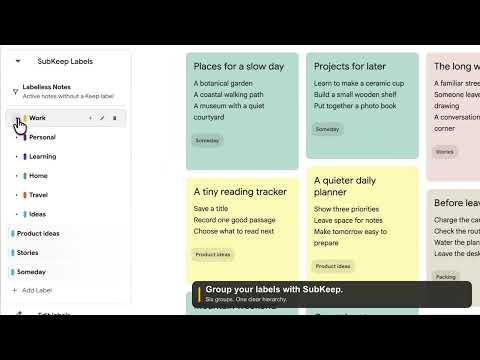
Organize Google Keep labels into a nested sidebar, navigate your notes, and focus with Zen Mode.
Organize the Google Keep labels you already use into a clearer sidebar. Choose existing labels from a searchable picker, put them under a group, and click a linked label to open its matching Keep notes. No label names to retype. A short, optional setup guides you through your first organization. Groups organize your sidebar. Linked labels open native Keep views. You can move either with drag and drop or Move under…, inspect the destination before saving, and undo your latest organization change. Changing a sidebar display name keeps its native label connection intact. Missing connections offer retry, reconnect, or conversion to a group. Create and rename native labels in Google Keep. SubKeep does not automatically organize notes or create native sublabels. You choose your structure. You can hide organized duplicates while keeping other native labels and Keep's Edit labels controls available. Free includes 10 sidebar items total, counting groups, with 2 nested items and one nesting level. Adding selected existing labels is included within those limits. Pro retains its larger organization allowances and existing features, including bulk re-import and backup restore. Backups contain sidebar organization, not note content. Usage sharing is optional and off by default. Enabling it uses a separate random identifier to report a small set of product milestones. It excludes note content, label names, hierarchy, account identifiers and URLs. You can turn it off in Settings to stop collection and clear unsent events. Removing SubKeep may open a voluntary feedback page; feedback is sent only when you choose Send feedback. PRO - No commercial sidebar-item count cap. - Hierarchies up to 3 levels below a root. - Labelless Notes, Zen Mode, bulk Keep re-import, and validated JSON backup restore. - Up to 3 active Chrome profiles per paid account. TRIAL AND PRICING Try Pro for 7 days after explicitly entering and verifying a SubKeep email. No card is required and the trial does not charge automatically. When the trial ends, your labels remain visible, navigable, editable for maintenance, deletable, and exportable; new changes that increase an exceeded Free allowance are blocked. Pro is EUR 5/month by default or EUR 48/year when annual billing is explicitly selected, a 20% saving against twelve monthly payments. Advertised EUR prices are tax-inclusive; any provider currency conversion is shown at Checkout. New subscriptions use Stripe Managed Payments, sold through Link. IMPORTANT FREE/PRO CHANGE IN 0.0.7.2 Every eligible profile updating from an earlier SubKeep version receives a fresh five days of full access after its first successful anonymous server registration. The signed deadline is bound to a random installation identity. Small, dismissible reminders appear at the start and near two days and one day remaining, no more than once per 24 hours. Fresh installations begin on Free immediately and may explicitly start the separate 7-day trial after email verification. When access returns to Free, existing labels stay visible, navigable, editable for maintenance, removable, and exportable; only paid features and changes that expand beyond the Free allowance are blocked. PRIVACY AND BOUNDARIES SubKeep does not send Google Keep note content, labels, hierarchy, or Google account identifiers in commerce requests. Automatic transition registration sends only a random installation identifier and migration identifier; the server stores a one-way hash and the network address needed for issuance rate limiting. Optional account, trial, billing, and existing-license actions use only the verified SubKeep billing identity and authentication or payment metadata needed to provide the service. SubKeep does not change Google Keep's flat label structure or automatically assign labels to notes. Because SubKeep integrates with Google Keep's interface, Google changes can temporarily affect compatibility. SubKeep is an independent project and is not affiliated with, endorsed by, or sponsored by Google.
2.7 out of 56 ratings
Details
- Version0.0.8.1
- UpdatedOctober 9, 2026
- FeaturesOffers in-app purchases
- Offered byskorudzhiev
- Size133KiB
- LanguagesEnglish
- Developer
Email
skorudzhiev@gmail.com - Non-traderThis developer has not identified itself as a trader. For consumers in the European Union, please note that consumer rights do not apply to contracts between you and this developer.
Privacy

SubKeep has disclosed the following information regarding the collection and usage of your data. More detailed information can be found in the developer's privacy policy.
SubKeep handles the following:
This developer declares that your data is
- Not being sold to third parties, outside of the approved use cases
- Not being used or transferred for purposes that are unrelated to the item's core functionality
- Not being used or transferred to determine creditworthiness or for lending purposes