


Overview
Record, transcribe and summarize Google Meet, Zoom and Teams calls with AI notes and action items.
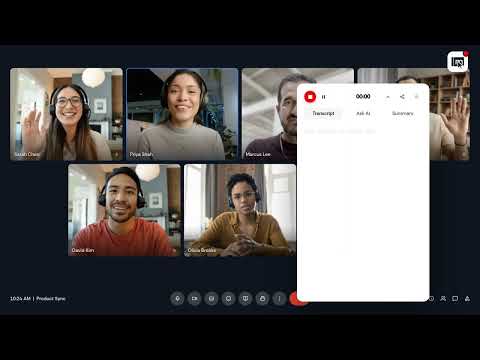
Meetbook turns any meeting or audio on your browser into structured knowledge with live transcription, sharp summaries, and AI that understands conversations. Works with Zoom, Microsoft Teams, and Google Meet with a true no-bot experience in Meet and Teams. Also captures audio from YouTube, online courses, podcasts, and any browser tab. What Makes Meetbook Different Most tools just transcribe. Meetbook understands. It provides real-time context, structured outputs, and AI that responds like it attended the meeting. Key Features * Live transcription and captions with high accuracy * Smart summaries with decisions, action items, and key points * AI chat for meetings: ask questions and get instant answers * No-bot experience in Google Meet and Teams * Works on any website with audio including YouTube and webinars * Search and export transcripts to docs or other tools How to Set Up * Install the extension * Pin it from Chrome extensions * Click the Meetbook icon and log in or sign up Using Meetbook with Google Meet * Join a Google Meet meeting * Meetbook activates automatically * Choose to record locally (no bot) or enable AI capture * View live transcript inside the meeting Using Meetbook with Zoom * Open the Zoom link in Chrome * Meetbook detects the meeting * Start recording or enable auto-summary * Optional: sync calendar for automatic capture Transcribing Any Website Audio * Open any site like YouTube or online lectures * Click Record from Meetbook * A live transcript overlay appears * Minimize or expand anytime Why Meetbook Wins * No bot friction * Faster summaries * Cleaner insights * Built for real work, not just note-taking Support Web: https://meetbook.app Support: https://meetbook.app/contact LinkedIn / Twitter: Meetbook AI
4.9 out of 517 ratings
Details
- Version3.0.5
- UpdatedOctober 5, 2026
- FeaturesOffers in-app purchases
- Size408KiB
- LanguagesEnglish
- DeveloperWebsite
Email
support@meetbook.app - Non-traderThis developer has not identified itself as a trader. For consumers in the European Union, please note that consumer rights do not apply to contracts between you and this developer.
Privacy

Meetbook: AI Meeting Notetaker has disclosed the following information regarding the collection and usage of your data. More detailed information can be found in the developer's privacy policy.
Meetbook: AI Meeting Notetaker handles the following:
This developer declares that your data is
- Not being sold to third parties, outside of the approved use cases
- Not being used or transferred for purposes that are unrelated to the item's core functionality
- Not being used or transferred to determine creditworthiness or for lending purposes
Support
For help with questions, suggestions, or problems, visit the developer's support site