


Overview
Your AI Chief of Staff, always available while you browse.
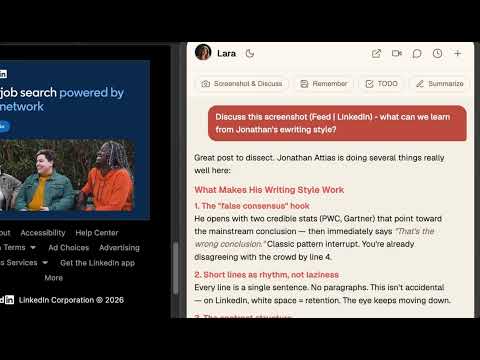
Your AI Chief of Staff, docked in every tab — executive briefings, quick capture, voice notes, screenshot Q&A, and meeting notetaking without switching apps. FEATURES - Side panel chat with streaming responses and recent conversation history - Executive briefing on open — today's overview, focus, and the items that need you (approvals, meeting prep, drafts ready) - Screenshot & Discuss — capture the current page for context-aware help - Voice messages — record a note, Chief transcribes and responds - File attachments — drop in images, PDFs, docs, or audio - Quick capture — save memories, add TODOs, or summarize any page in one click - Right-click context menu — ask your Chief about any selected text - Join a meeting — send a notetaker to Google Meet, Zoom, Teams, or Webex WHATSAPP CAPTURE (opt-in, per chat) Turn the WhatsApp conversations that matter into durable facts for your Chief — so decisions, intros, and commitments are remembered without you re-typing them. It uses your existing WhatsApp Web session, and you stay in control of every chat: - Group chats are never captured unless you turn them on yourself. - One-to-one chats with people already in your Team0 workspace (from your email, calendar, or meetings) start as "Capture while viewed." Everything else — unknown numbers, people you've never corresponded with — starts as "Skip." - Every chat shows its current setting in WhatsApp Web, and you can switch any chat to Skip at any time. Your choice always overrides the default. - A chat is only ever read while you have it open in WhatsApp Web. - From captured chats, only distilled facts (people, decisions, requests, commitments) plus a short supporting quote are saved to your Team0 workspace. The full conversation is never stored. - Chats you skip are never read. Chats you never open are never seen. PRIVACY - Page content (screenshots, page text) is read only when you explicitly trigger an action — Screenshot & Discuss, Summarize, or Ask about selection. No background scraping of the pages you browse. - WhatsApp is per-chat and always overridable: groups are off unless you turn them on, one-to-one chats with people already in your workspace are on by default, and any chat is only read while you have it open. - All data goes to your own Team0 account at api.team0.ai. No ads. No third-party analytics on host sites. Your data is never sold. REQUIREMENTS - A Team0 account (sign up at team0.ai) - Sign in once at team0.ai — the extension keeps itself connected as long as you stay signed in to team0.ai in the same browser This extension connects to your existing Team0 workspace — same AI Chief of Staff, same memory, same tools as the web app at team0.ai.
0 out of 5No ratings
Details
- Version1.2.5
- UpdatedAugust 1, 2026
- Size293KiB
- LanguagesEnglish (United States)
- DeveloperWebsite
Email
hey@team0.ai - Non-traderThis developer has not identified itself as a trader. For consumers in the European Union, please note that consumer rights do not apply to contracts between you and this developer.
Privacy

Team0 – Chief of Staff Everywhere has disclosed the following information regarding the collection and usage of your data. More detailed information can be found in the developer's privacy policy.
Team0 – Chief of Staff Everywhere handles the following:
This developer declares that your data is
- Not being sold to third parties, outside of the approved use cases
- Not being used or transferred for purposes that are unrelated to the item's core functionality
- Not being used or transferred to determine creditworthiness or for lending purposes
Support
For help with questions, suggestions, or problems, visit the developer's support site