


Overview
Turn any word list into vocabulary games: spelling test prep, sight words, class lists for teachers, English vocabulary for adults.
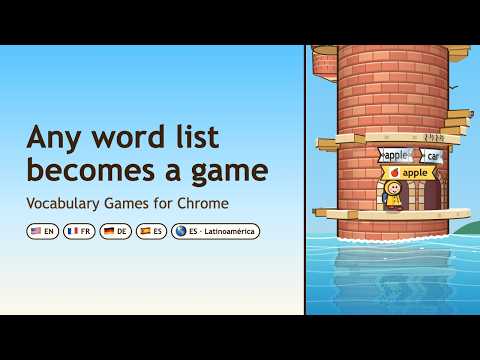
Words Tower turns any word list into vocabulary games: for kids with this week's spelling list, for teachers with a class, and for adults learning English. A little hero in a yellow raincoat walks around a turning brick tower by the sea. The game shows a word and says it aloud; you walk into the door with that word, and the right door turns the tower to the next ledge. It opens in Chrome's side panel, next to homework or work: one click on the toolbar icon, a tower beside the page you are on, then back to it. Short vocabulary practice games, one tower at a time. 🎯 Test prep for this week's spelling list Paste the spelling words from school and set the date of the spelling test or vocabulary test. The game spreads the new words so that every one is met before the test, and familiar words turn into spelling practice. 1️⃣ Paste the list in Test prep: a plain list, a table or "word - translation" lines. 2️⃣ Only a photo of the sheet? A ready request for ChatGPT turns it into words and draws a picture for each. 3️⃣ Set the test date. 4️⃣ Your child climbs about a tower a day. 5️⃣ Follow the colours: shown, learning, familiar, mastered, and the hard words. 6️⃣ Print practice sheets: look at the word, trace it along a dotted line, write it four times. A QR code on each sheet opens the same words in the game. 7️⃣ Give the home test from the last printed pages: numbered lines for your child, the words in a shuffled order for you. ✍️ Spelling games on the doors Once a word is familiar, its doors show three spellings: the right one and two look-alike mistakes (letters swapped, a letter dropped or doubled, a vowel changed). Only the door with the right spelling opens. So at the spelling test or vocabulary quiz at school, your child is not writing the word for the first time. 📖 Sight words to learn to read The Dolch sight words and the first Fry lists are built in, by grade. The word is said aloud and the child finds it written on a door: sight word games and reading games for early readers. 🌍 Everyday English vocabulary Vocabulary building games with sets from ten to a thousand useful English words, with pictures for words that can be illustrated. The game's interface is in English, French, German, Russian and two kinds of Spanish, with a translation hint for children who learn English as a new language. 💼 English vocabulary for adults Adults learning English get vocabulary games for adults too: nine sets of words for real situations, from the restaurant and the hotel to meetings and travel, taken from a research-based list of English for work. Every word is said aloud, with a hint in Russian, German, Spanish or French. A list of your own works as well, with its own test date. 🔁 Vocabulary review games that bring words back • Words your child knows return less often; hard words come back sooner. • A wrong door stays shut, and its word returns later. • Picking the right door on the first try earns stars, and a streak shows at the top. • A small reward waits at the top of each tower, and every tower is built anew. 🌿 A calm vocabulary game ⏱️ The challenge is the words, not the controls: no timers, and the hero hops over gaps on its own. 🚤 Falling off a ledge costs nothing: a little submarine brings the hero back. 🚫 No ads, no purchases, no sign-up. 🔒 Progress stays in your browser and in your Chrome sync. 🔊 Every built-in word is read aloud by a natural American voice generated by AI. 🏫 Classroom vocabulary games Each child keeps their own words, progress and test date on one device, so brothers and sisters, or students sharing a classroom computer or a Chromebook, each practise their own list. A teacher or a parent can put the class's weekly words at one link, and every family that follows it gets the new list with the next tower: vocabulary games for students, at home and in class. ❓ Common questions Q: Does my child need an account? A: No. Progress stays in the browser and in your Chrome sync. Q: Is it only for children? A: No. Adults learning English have their own sets for work and travel, and anyone can paste a list of their own. Q: Which sight word lists are included? A: The Dolch lists and the first Fry lists. Q: Can we practise on paper too? A: Yes: a word list for the fridge, practice sheets, and a home test on the last pages. Q: Does the extension read the pages I visit? A: No. It needs only two permissions: storage, to keep the progress, and the side panel, to open there. ✨ New in 2.3 • Class lists: follow your class's weekly words at one link; each new list arrives with the next tower. • A weekly board: join with a made-up nickname, only if you choose to. • Practice sheets carry a QR code that opens the same words in the game. 💻 Also as online vocabulary games in the browser, with nothing to install: vocabularygames.org
5 out of 52 ratings
Details
- Version2.3.1
- UpdatedOctober 9, 2026
- Size34.5MiB
- Languages52 languages
- DeveloperWebsite
Email
promptgenerator.cws@gmail.com - Non-traderThis developer has not identified itself as a trader. For consumers in the European Union, please note that consumer rights do not apply to contracts between you and this developer.
Privacy

This developer declares that your data is
- Not being sold to third parties, outside of the approved use cases
- Not being used or transferred for purposes that are unrelated to the item's core functionality
- Not being used or transferred to determine creditworthiness or for lending purposes
Support
For help with questions, suggestions, or problems, visit the developer's support site