


Overview
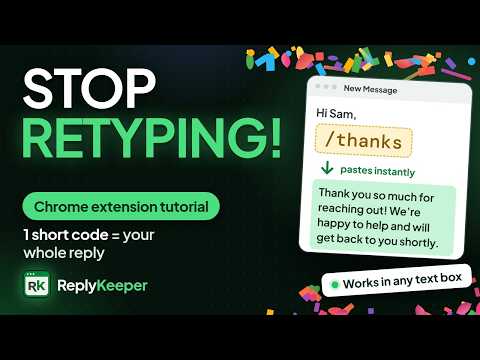
Save text snippets & insert them anywhere in one click or with short codes like /thanks. Fast, private, no sign-up. Free.
Are you tired of typing the same text messages over and over? With Reply Keeper, you can save, copy, and organize your messages easily and quickly. It is your text shortcut that copies and pastes text in clipboard easily. You don't need to keep the most often-used text replies in other apps and folders. Reply Keeper is a useful Chrome browser extension designed to help you write and save email templates, social media replies, AI prompts, Gmail formats, personal notes, To-do lists, text snippets, login passwords, most frequently used text messages, repetitive questions, save code snippets, quick notes, and other repeated text-based content effortlessly. Most people use a notepad, a Word document, and a snippet tool to store their text. But they are not instantly reachable. With Reply Keeper, you can use saved replies to respond faster, which will save you time and effort. Type a short code and your full message appears instantly. Give any snippet a short code, for example /thanks. Then type it in a text box on a website, such as an email, a comment or a chat message box, and Reply Keeper replaces it with your saved text right away. You don't even need to open the extension. Short codes are turned on automatically when you install it, and you can turn them on or off anytime from the extension menu. The extension offers a 1-click copy and paste functionality. You can instantly copy your saved text to the clipboard, and then you can paste it anywhere and send quick replies on emails, social media, chatbot, and user response platforms. It has a sleek, user-friendly design. You can edit, delete, or move your saved text reply easily. Pin important notes, search through your saved content, and even export/import your data. You can save your text in rich HTML format or plain text. No worries! How to Use It? A Quick Guide on Its Top Features 1. Install the Extension 2. Open Reply Keeper in Chrome Browser 3. Create and save your text snippets - Click the + Add Text button and enter a title and your text message. - You can add a category for your snippet - Add an optional short code (for example /thanks) to paste this snippet just by typing it - Click the Save button or press Ctrl+S short key to save. Note: To store text in a specific font, write your message where the font is available, then paste it into the Reply Keeper visual panel. 4. Manage Saved Text and canned replies - Short codes: Type your short code in any text box and it turns into your full saved text. Type just the first letters of a code to see a list of matching snippets, then press Tab or Enter to pick one. - Copy: 1-click copy to clipboard. - Paste: Click in any text field to paste your saved text instantly on the webpage. - Edit/Delete: Modify or remove notes easily. - Reorder: Drag and drop your snippets to move at desire place - Pin/Unpin: Pin important ones. - Search: Find notes by keywords. - Move: You can easily move your snippet in relevant category. - Undo: Deleted a snippet or a whole category by mistake? Click Undo to bring it back. - Save from any page: Select text on any web page, right-click, and choose "Save selection to Reply Keeper". 5. Additional Features - Export/Import: Backup or transfer notes as JSON. - Auto-Save: Drafts are saved temporarily. - Learn from a video or a weblink - How does it work? - Smart fill-in fields: {date}, {time} and {day} fill in automatically. Use {cursor} to choose where your cursor lands after pasting. Any other {field}, like {name}, asks you for the value when you use the snippet. - Rich text: add bold, colors, links, images and emoji to your snippets, or keep them as plain text. - Private: your snippets are saved in your browser, on your own device. Reply Keeper does not send your text to any server. - Fun finish: a small confetti burst and a soft keyboard sound let you know a short code was pasted. 6. Use Anywhere - Copy and paste saved replies into any app or website effortlessly. - Type short codes right in email, social media and chat message boxes, without opening the extension. Does It Work on Other Websites or Platforms? Yes, it works on Gmail, Insta, FB, and other websites where users want to copy text for emails and social media replies. Short codes work in text boxes on most websites, including email, comment and chat message boxes. Stop retyping! Keep your common replies in one place for easy access. Install the extension now to boost productivity and save time.
4.9 out of 514 ratings
Details
- Version3.5.0
- UpdatedOctober 25, 2026
- Size166KiB
- LanguagesEnglish
- DeveloperWebsite
Email
newergadgets@gmail.com - Non-traderThis developer has not identified itself as a trader. For consumers in the European Union, please note that consumer rights do not apply to contracts between you and this developer.
Privacy

This developer declares that your data is
- Not being sold to third parties, outside of the approved use cases
- Not being used or transferred for purposes that are unrelated to the item's core functionality
- Not being used or transferred to determine creditworthiness or for lending purposes
Support
For help with questions, suggestions, or problems, please open this page on your desktop browser