Item logo image for Stream Katcher

Stream Katcher

ExtensionTools6 users
Item media 5 (screenshot) for Stream Katcher
Item video thumbnail
Item media 2 (screenshot) for Stream Katcher
Item media 3 (screenshot) for Stream Katcher
Item media 4 (screenshot) for Stream Katcher
Item media 5 (screenshot) for Stream Katcher
Item video thumbnail
Item media 2 (screenshot) for Stream Katcher
Item media 3 (screenshot) for Stream Katcher
Item media 4 (screenshot) for Stream Katcher
Item media 5 (screenshot) for Stream Katcher

Overview

Detect and analyze media streams in the current tab.

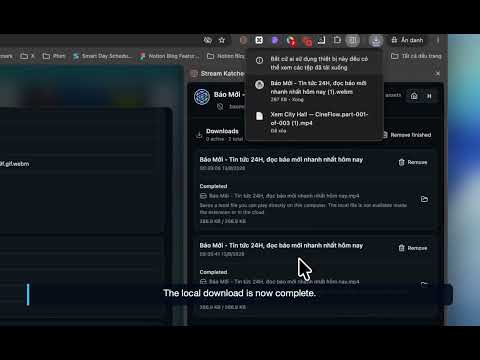
Stream Katcher Find, play, and keep media from the current Chrome tab. Watching a video should not require guessing how the page delivers it. Stream Katcher shows media resources used by the current tab and helps you inspect, play, save, download, and organize them. Stream Katcher detects and plays media resources exposed by the page and browser. It is not a screen recorder. Detect media from the current tab • See video and audio as the page loads and receives media requests. • Detect progressive MP4, WebM, M4A, AAC, and HTTP byte range media. • Detect HLS playlists using M3U8. • Detect DASH manifests using MPD. • Detect CMAF, fragmented MP4, M4S, and MPEG TS resources. • Identify Media Source playback and source changes on dynamic pages and embedded players. The extension groups related requests into one media asset instead of showing every segment separately. It connects manifests, initialization resources, segments, redirects, byte ranges, headers, and page context for a clearer source view. Understand what was detected See the title, page, domain, file name, delivery type, duration, resolution, live status, tracks, source health, and protection status. Open details, copy URLs, or remove an asset. Work from the Side Panel • Group detected assets by page. • Use favicons and previews to recognize the source. • Search by title, page, domain, platform, URL, or delivery type. • Filter by video, audio, HLS, DASH, MP4, MSE, duration, saved date, or source health. • Sort assets, check availability, or refresh the page when a temporary URL expires. Preview and play media • Preview detected media in the Side Panel or page overlay. • Enable hover preview and generate thumbnails or storyboards when possible. • Play supported progressive, HLS, and DASH sources in the built in player. • Choose video quality and audio tracks when provided by the source. • Control speed from 0.5 times to 2 times. • Seek through the timeline and view buffered ranges. • Use fullscreen, Picture in Picture, volume, mute, Go Live, loop, or an A to B repeat range. • Resume the last position and remember speed or volume when enabled. Save or download media Save to Library keeps a source reference, metadata, and preview. It does not create a local file. If the source expires, playback may no longer be possible. For supported files, download direct MP4, WebM, or audio media to your computer. Track progress, cancel jobs, retry failures, remove records, and show completed files in Finder when available. For supported HLS and DASH sources, Stream Katcher can resolve playlists, collect resources and segments, preserve track order, assemble compatible resources, and mux separate tracks into one output file. Use Turbo Download for larger media Turbo Download is an optional macOS companion for eligible access. • Process large or segmented HLS and DASH media outside the browser memory budget. • Combine separate video and audio tracks. • Use native FFmpeg for remuxing. • Save completed files to the Mac Downloads folder. • Show download, assembly, remux, validation, and completion states. Turbo Download is separate from the extension and must be installed and running for native downloads. Use Google Drive and sync With eligible Google Drive access, connect your account and manage files uploaded by Stream Katcher. • Upload completed media to the Google Drive app specific data folder. • View file name, type, size, and modified time. • Play or delete uploaded files, upload a local download later, or switch to the Drive copy. The integration uses the app specific data folder instead of requesting access to your general Drive files. When cloud sync is enabled, synchronize saved metadata, playback information, thumbnails, and storyboards across browser profiles. Control scanning and protect your data • Block a domain and its subdomains when you do not want them scanned. • Start a new capture session or clear the session without clearing the Library. • Keep Incognito behavior separated from the regular browser profile. • Protect Library, Downloads, and Google Drive with a local PIN. • Use a recovery code and temporary lockout after repeated incorrect attempts. Important boundaries • Stream Katcher does not record your screen or bypass DRM. • Protected or encrypted media may be detected but cannot be played or downloaded. • An MSE blob may identify in page playback without providing a stable downloadable URL. • Live streams may be detected and played when supported, but are not automatically treated as downloadable video on demand files. • Some sites require page context, request headers, cookies, or an active session. • Expired sources, unsupported codecs, browser rules, and provider policy can affect availability. Keep the media workflow visible, accurate, and close to the tab where it started.

Details

  • Version
    1.3.0
  • Updated
    September 7, 2026
  • Features
    Offers in-app purchases
  • Offered by
    HONGDUC
  • Size
    30.92MiB
  • Languages
    English
  • Developer
    Nguyễn Hồng Đức
    38/9 Phùng Hưng, An Bình, TP Rạch Giá, Kiên Giang Rạch Giá, Kiên Giang 91100 VN
    Email
    hongducmmo@gmail.com
    Phone
    +84 918 873 984
  • Trader
    This developer has identified itself as a trader per the definition from the European Union and committed to only offer products or services that comply with EU laws.

Privacy

Manage extensions and learn how they're being used in your organization

Stream Katcher has disclosed the following information regarding the collection and usage of your data. More detailed information can be found in the developer's privacy policy.

Stream Katcher handles the following:

Personally identifiable information
Authentication information
Web history
Website content

This developer declares that your data is

  • Not being sold to third parties, outside of the approved use cases
  • Not being used or transferred for purposes that are unrelated to the item's core functionality
  • Not being used or transferred to determine creditworthiness or for lending purposes

Support

For help with questions, suggestions, or problems, visit the developer's support site

Google apps