

Zetoe : AI Writing, Grammar & Research Assistant

Overview
Write smarter. Research faster. Do more without switching tabs.
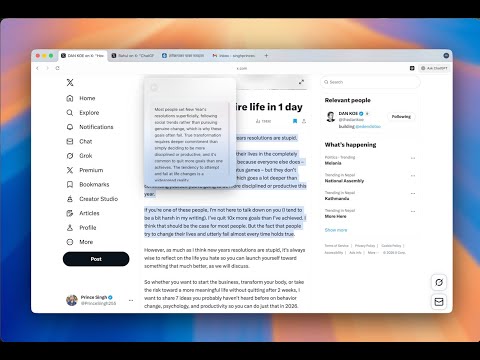
Select any text on the web and instantly turn it into something more useful whether it is a concise summary, a translation, a verified fact, or a grammar fix. Zetoe keeps you focused with no tab switching and no copy-pasting. ➤ What you can do with Zetoe • Summarize long articles and documents into clear, concise points • Translate text into 50+ languages instantly • Fact-check claims with sourced references • Correct grammar and spelling errors in real time • Auto-fill forms intelligently using AI that understands context ➤ Key features • Works on any website • Beautiful, minimal interface • Keyboard shortcuts for power users • Privacy-focused with your data staying in your browser • Free tier with 500 AI credits ➤ How it works Zetoe integrates seamlessly into your browser and works across popular websites like Gmail, Google Docs, LinkedIn, blogs, and more. You get real-time suggestions and insights without interrupting your workflow. • Install Zetoe from the Chrome Web Store • Select any text on a webpage • Click the Zetoe bubble that appears • Choose your desired action such as summarize, translate, fact-check, or grammar check • Get AI-powered results instantly ➤ Privacy first Your data is fully under your control • No personal data stored on Zetoe servers • Auto-fill profiles stored locally in your browser • Secure HTTPS encryption for all requests • Full control over feature permissions ➤ Plans and usage Free plan • Includes 500 AI credits to get started • Access to core writing, summarization, translation, and grammar tools Pro plan • Unlimited AI usage • Priority response and performance • Full access to advanced rewriting, translation, summarization, and productivity features Start for free and upgrade anytime to unlock unlimited AI assistance ➤ Need help? Contact us at support@zetoe.com ➤ Terms of Service & Privacy Policy Terms: https://zetoe.com/terms Privacy: https://zetoe.com/privacy
5 out of 53 ratings
Details
- Version1.1.8
- UpdatedMay 27, 2026
- FeaturesOffers in-app purchases
- Size7.37MiB
- LanguagesEnglish (United States)
- DeveloperWebsite
Email
info@universalml.net - Non-traderThis developer has not identified itself as a trader. For consumers in the European Union, please note that consumer rights do not apply to contracts between you and this developer.
Privacy

This developer declares that your data is
- Not being sold to third parties, outside of the approved use cases
- Not being used or transferred for purposes that are unrelated to the item's core functionality
- Not being used or transferred to determine creditworthiness or for lending purposes
Support
For help with questions, suggestions, or problems, please open this page on your desktop browser