

Meters to Yards for Google Maps
15 件の評価
)
概要
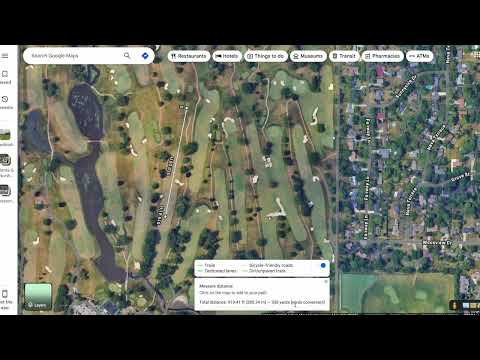
Convert Google Maps meters to yards
The Google Maps "Measure distance" tool is great, and this extension makes it even better. Made especially for golfers that don't rely on meters, you'll now be able to see distances in yards. How to Use the Extension: 1. Open Google Maps. 2. Right-click anywhere on the map and select “Measure distance.” 3. Click on the map at least twice to plot your points. 4. Continue adding points along the golf hole — the white distance box at the bottom will automatically display the converted distance in yards. Note: The extension only converts line distances (not area). It won’t display conversions for closed loops (when the first and last point overlap). Distances equal to or greater than 1 km won’t be converted. Need help? Watch the tutorial here: https://youtu.be/wa0DmiOIH60 If you're having problems with the extension, please email me at meterstoyards@gmail.com.
5 点満点で 4.515 件の評価
詳細
- バージョン0.58
- 更新:2026年1月15日
- 提供元James G
- サイズ1.09MiB
- 言語English (United States)
- デベロッパーJames Gottschalk
757 E 20th Ave MB307 Suite 370 Denver, CO 80205 USメール
adsbxaddon@gmail.com - 非取引業者このデベロッパーは取引業者として申告していません。EU 加盟国の消費者とこのデベロッパーとの間に締結された契約には、消費者の権利が適用されません。
プライバシー
Meters to Yards for Google Maps から、お客様のデータの収集と使用に関する以下の情報が開示されています。 詳しくは、デベロッパーの privacy policy をご確認ください。
Meters to Yards for Google Maps は次を扱います。
このデベロッパーは、お客様のデータについて以下を宣言しています
- 承認されている以外の用途で第三者に販売しないこと
- アイテムの中心機能と関係のない目的で使用または転送しないこと
- 信用力を判断する目的または融資目的で使用または転送しないこと
サポート
質問や提案、問題がある場合は、デベロッパーのサポートサイトにアクセスしてください。