


Overview
Know what every AI message costs. Token tracking, prompt optimization, and an on-device intent brain for Claude and Gemini.
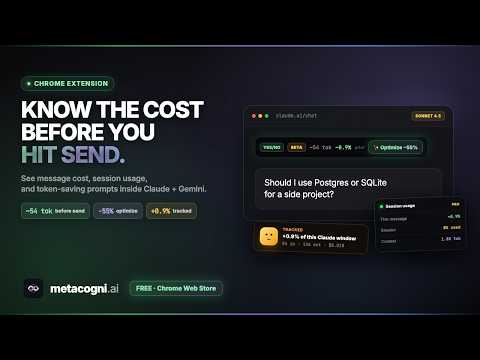
MetaCogni optimizes your prompts for what you really want — and shows you what every AI message costs, live, before you hit send. As you type in Claude or Gemini, MetaCogni estimates tokens and budget impact, suggests one-click presets for the prompt shape you're aiming at, tracks every token across your sessions, explains every prediction that missed, and nudges you to start a fresh chat when your current one has gone stale. The problem. Paying for Claude Pro, Max, or Gemini AI Pro means working against a cap you can't see. You don't know how close you are, how much each chat is costing, whether the prompt you're about to send will burn 200 tokens or 20,000, or whether the chat you've been in for the last forty minutes is now dragging answer quality down. You find out by hitting the cap mid-task. What MetaCogni does about it: One-click prompt optimization. MetaCogni runs an 11-intent classifier on your prompt as you type — yes/no, explain, comparison, code generation, code fix, math, list, factual, conversational, creative, general. When it's confident about your intent, it offers a preset. Compress shrinks the prompt to a verdict or short answer (Yes/No + caveat, Verdict only). Enrich expands it for a deeper reply (Like I'm 5, Side-by-side table, Walk through step by step). You stay in control of every edit; nothing rewrites your prompt automatically. The classifier gets better at your patterns the more you use it. Pre-send cost preview. A small bar above the chat input shows estimated tokens, your prompt's percentage impact on this session, and an inline intent badge. Updates live as you type. The estimate uses your subscription's daily and hourly budget, not arbitrary character counts, so the percentage is grounded in what the platform actually meters. Live session tracking. A floating overlay at the corner of Claude and Gemini shows session cost (or budget percentage), message count, time until reset, current chat's input/output tokens, optimized-preset count for the session, total tokens saved by compression, and a streaming indicator while the model is replying. Numbers come straight from each platform's response data — real input/output tokens, cache reads, Gemini thinking tokens — not character-counted guesses. What you see matches what you're billed for. Context management and fresh-chat advice. Long chats get expensive two ways. First, every new turn ships all the prior conversation back to the model — that's the context tax MetaCogni surfaces in the overlay. If your current chat already carries 49K tokens, every new message starts from that cost baseline before you even type. Second, model reasoning quality degrades as context fills; the model has more to attend to, drifts off-thread, and produces vaguer answers. MetaCogni tracks both. A context-tax indicator shifts from low (green) to medium (amber) to high (red) as the baseline climbs. A focus score (0–100) tracks how heavy the chat has become. As focus drops, MetaCogni suggests considering a fresh chat — and strongly recommends one when focus dips into the warning band. The label you'll see ("fresh chat advised") means the chat has gone cold: context tax is high, focus is low, and the next request will be both more expensive and less sharp than the same prompt in a new chat. Starting fresh resets the baseline cost and almost always answers more cleanly. The mascot peeks in to make sure you don't miss the nudge. Postmortems on every miss. When a turn runs longer than predicted, a toast appears explaining what ran long, why MetaCogni's prediction missed, and what to type differently next time. Expand the toast for a three-tab breakdown: Numbers (session %, platform meter, message %, context carried, output vs estimate delta), Could be better (fillers and structural issues found in your prompt), and Brain says (the intent it detected and the nudge text that would have shrunk the reply). Most extensions hide their misses. MetaCogni teaches from them, and the predictor gets better at your patterns the more you use it. 7-day and 30-day trends. Daily and rolling rollups for Claude and Gemini side by side. Token counts, API-equivalent dollars, share of plan used, and pace flags (above or below your 7-day average). Answers the question every subscription user eventually asks: is the plan paying for itself? Useful when deciding whether to upgrade from Pro to Max, or whether to switch to a per-token API workflow entirely. Two ways to read cost. Toggle the overlay between subscription-percentage view ("how much of my plan is left") and API-equivalent dollars ("what would this turn cost on the API"). The API number uses each model's current per-token prices — Opus, Sonnet, Haiku, Gemini Pro and Flash — so the comparison is honest. Useful for understanding whether your subscription is paying for itself. Real billing data. MetaCogni reads token counts from each platform's actual response data, including Gemini's thinking tokens and cache-read tokens, which are easy to miss with character-count estimates. It auto-detects the active model (Opus, Sonnet, Haiku, Gemini Pro, Gemini Flash) and applies the right per-token prices. Subscription budgets are reverse-engineered from Anthropic's and Google's public pricing plus community-reported rate limits, with last-verified dates carried inside the extension so budgets stay current as plans change. Who it's for. Heavy Claude or Gemini users who hit caps regularly. Developers comparing what their AI bill would look like on the API. Subscribers deciding whether to upgrade. Anyone tired of pasting a long prompt and waiting to see whether it'll cost a few cents or a few dollars. Reads your Claude and Gemini chats locally to compute token counts, intent classifications, and predictions. Operates within the browser; no accounts required. Works in: claude.ai (the web chat) and gemini.google.com. Supports Claude Opus, Sonnet, and Haiku, and Gemini Pro and Flash. Not active inside Claude Code (the CLI).
5 out of 52 ratings
Details
- Version0.8.23
- UpdatedJune 4, 2026
- Size23.94MiB
- LanguagesEnglish
- DeveloperWebsite
Email
team@metacogni.ai - Non-traderThis developer has not identified itself as a trader. For consumers in the European Union, please note that consumer rights do not apply to contracts between you and this developer.
Privacy

MetaCogni — AI Cost Tracker has disclosed the following information regarding the collection and usage of your data. More detailed information can be found in the developer's privacy policy.
MetaCogni — AI Cost Tracker handles the following:
This developer declares that your data is
- Not being sold to third parties, outside of the approved use cases
- Not being used or transferred for purposes that are unrelated to the item's core functionality
- Not being used or transferred to determine creditworthiness or for lending purposes
Support
For help with questions, suggestions, or problems, please open this page on your desktop browser