


개요
Meta Tag Explorer는 방문하는 모든 웹사이트의 SEO 메타를 찾는 최고의 SEO 도구입니다
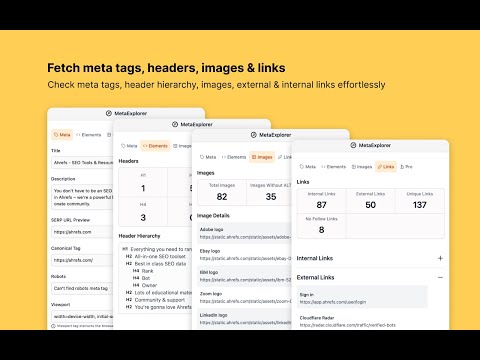
Meta Explorer - The easiest and fastest way to find SEO Meta. - Find issues with your on page SEO in seconds (You can export issues as csv). - Pin the extension to keep it open across page refreshes. This comes in handy if you want to check SEO Meta of your content pages like your blog. - Works well on single page apps - Pleasant and modern UI All the existing tools need you to either click on an extension or copy paste the url in a tool to check the on page SEO. This gets very cumbersome if you have to check the on-page SEO for multiple pages, like a blog. With Meta Explorer, you don't need any clicks or copy-paste. Pin the extension & navigate to any page whose meta & on-page SEO you want to check and voila! you have the info in the sidebar. It also has a modern and pleasing UI. You won't get tired of looking at bad UI anymore. Key Features ✅ View & Copy meta tags ✅ View social tags (OG, Twitter) ✅ View header element count ✅ View header hierarchy ✅ Image file names & alt text ✅ Internal & External link count ✅ Links with Anchor text ✅ Scroll links into view ✅ Show schema markup if present ✅ Keyboard shortcut to toggle extension open/close (Cmd+Shift+E / Ctrl+Shift+E) 🐜 Issues - Check & Fix issues to improve your on page SEO. - Check Web Vitals - Export issues as CSV. 🔎 META - Title, Description, Robots, Viewport - Word count - Open Graph tags - Title, Description, Image - Twitter tags - Card, Title, Description, Image, Site, Creator, URL, Domain 🖥 ELEMENTS - HTML Header tag count - HTML Header tag hierarchy 🖼 IMAGES - Image count (Total images, Images without ALT, decorative images) - Image URL's - Image preview - Image ALT text 🔗 LINKS - Internal, External, No Follow link count - Links with Anchor text. - Check broken links - You can scroll the link into your view with a single click. 💬 Social - Check social preview of the site (Google, Twitter/X, Facebook, Linkedin, Slack) 🔧 Tools - Page speed insights - Ahrefs website authority checker - Partner SEO tools - Some links are affiliate links. Using them supports me to keep improving the extension. 🧐 Privacy - We don't collect any personal data or track any of your usage metrics. - We make network requests only to check broken links on your site, after you click on `Check Broken Links` button.
5점 만점에 4.9점평점 43개
세부정보
개인정보 보호

개발자가 사용자 데이터에 관해 다음과 같이 선언했습니다
- 승인된 사용 사례를 제외하고 서드 파티에 판매하지 않음
- 항목의 핵심 기능과 관련 없는 목적으로 사용하거나 전송하지 않음
- 신용도 판단 또는 대출 목적으로 사용하거나 전송하지 않음
지원
질문, 제안 또는 문제와 관련하여 도움이 필요하면 데스크톱 브라우저에서 이 페이지를 여세요.