

Priesm: Multi-LLM & AI Macro
4 ratings
)
Overview
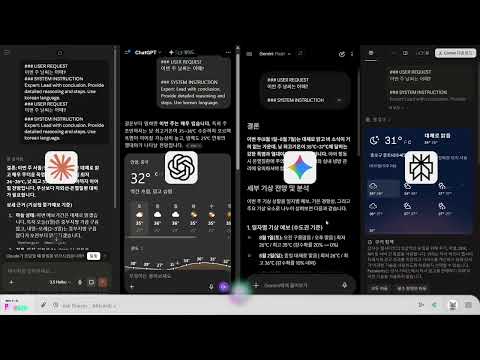
Multi-LLM Tiling Browser. Chat with Gemini, ChatGPT, Claude, and Grok simultaneously with a unified Priesm interface.
A service that uses three AI LLMs (Gemini, ChatGPT, and Claude) simultaneously and aggregates responses. 1. All conversations are saved solely in the Chrome browser, not through the server. 2. English translation and prompts have been added to the basic conversations for more precise conversations. *Ctrl+Enter for general conversations. 3. Summarize the conclusion in the first sentence for quick information comparison. 4. You can use your own account to access your paid LLM accounts. *For non-subscribed accounts, only the free quota is used. 5. Using your own account, you can use all the features of each LLM. 6. You can have separate conversations for each LLM you've set. 7. You can also add other sites using custom slots. *Some sites may be blocked. 8. If you log in at the bottom, the slot order and customization settings are remembered. 9. You can drag to translate. 10. Clicking the logo hides the main chat window, allowing only the split window function. Ver.3.29(260930) * Modified ChatGPT transmission logic Ver.3.27(260916) * System Prompt Customization Ver.3.25(260828) * Ray Performance Upgrade Ver.3.24(260805) * Resolved Claude's duplicate question error Ver.3.23(260803) * Ray's performance in synthesizing simultaneous answers has become 60% smarter compared to the previous version. * If you provide feedback on Ray's answers, Ray grows and provides better answers. Ver.3.22(260628) * Sleep mode added : Activated after 10 minutes or more of inactivity (memory saving). Ver.3.20(260617) * The "Ray (Beta)" feature, which aggregates AI responses, has been added. Ver.3.15(260508) * Modify button positions. * Prompt optimization. Ver.3.13(260426) * Adjusted slot scroll position. * Resolved notice flickering. * Modified login button. Ver.3.12(260414) * Resolving Global Send Button Errors Ver.3.10(260410) * Solving Shortcut Key Errors Ver.3.09(260401) * Gemini Korean Version Transfer Error Resolved Ver.3.05(260327) * Create Claude virtual button Ver.3.04(260326) * Side panel menu fixed * User level synchronization error fixed Ver.3.01(260318) * Rebranding (Merlin > Priesm) * Added perblexity * Introduced user level system * Added paid features for 4-grid * Organized inactive slots and folders * Removed grid selection feature * Other bug fixes ver.2.71(260220) * Added AI macros * Added a notification window * Disabled automatic translation in prompt dialogue * Added an LLM voting system * Added shortcut keys to each grid ver.2.67(260215) * Add custom URLs. * Activate macro functionality and enhance UX. 1. Register a custom site > 2. Mount it to the grid > 3. Click "Settings" in the top center > 4. Automate conversations and add logic > 5. Add input prompts > 6. Click the select target > 7. Click the dialog window where you want to apply the automatic prompt > 8. Add actions (Enter, Control-Enter, Click) based on the site > 9. Click the select target > 10. Start testing > 11. Save > 12. Chat in the main dialog window > 13. Confirm the chat has been sent to the custom site. ver.2.62(260213) * Frame Isolation Engine: Improved stability to ensure Merlin's automation runs strictly within its frames, preventing accidental interference with regular browser tabs. * Expanded AI Support: Fully integrated Grok (X.ai) Optimized Gemini conversation logic for better history tracking. * Persistent Layouts: Your custom bot arrangements, active status, and layout modes are now automatically saved and restored across sessions. * UI Optimization: Removed unnecessary animations and improved UI responsiveness for a more professional, high-performance experience. * Privacy & Compliance: Updated data handling practices to meet the latest security standards and minimize data usage. ver.2.56 Bug fixes . . . Your donation of a cup of coffee will help us create a better service. Thank you.
5 out of 54 ratings
Details
- Version3.2.9
- UpdatedOctober 1, 2026
- FeaturesOffers in-app purchases
- Offered byLed
- Size313KiB
- LanguagesEnglish (United States)
- Developer
Email
led@kakao.com - Non-traderThis developer has not identified itself as a trader. For consumers in the European Union, please note that consumer rights do not apply to contracts between you and this developer.
Privacy

Priesm: Multi-LLM & AI Macro has disclosed the following information regarding the collection and usage of your data. More detailed information can be found in the developer's privacy policy.
Priesm: Multi-LLM & AI Macro handles the following:
This developer declares that your data is
- Not being sold to third parties, outside of the approved use cases
- Not being used or transferred for purposes that are unrelated to the item's core functionality
- Not being used or transferred to determine creditworthiness or for lending purposes