


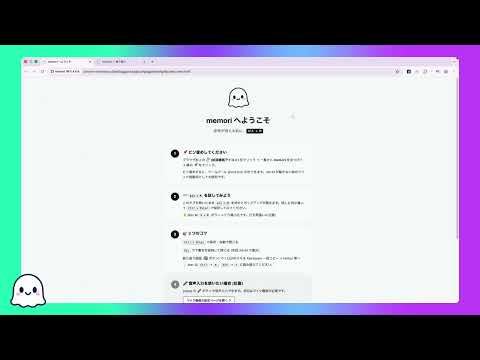
Overview
Capture mid-browse thoughts with Alt+M in 1 second. Local-only by default. Export to Markdown for Notion, Obsidian, anywhere.
memori is a Chrome extension that captures the thoughts and ideas you have mid-browse in 1 second with Alt+M, and lets you review them in Markdown format later. ■ Who is it for - People who scatter their mid-work thoughts across Slack DMs to self, sticky notes, and random Notion pages - People who want to write daily journal entries in Notion but find collecting moment-to-moment thoughts tedious - PMs, engineers, designers who don't want to lose mid-browse "wait, this is important" moments ■ Features ✓ Alt+M shortcut to open popup from anywhere in the browser ✓ Ctrl+Enter to save and return to work — minimal context switch ✓ Esc to close while keeping the draft (restored on next Alt+M) ✓ Opt-in voice input (perfect for thinking-aloud or walking notes) ✓ Daily review screen with one-click Markdown export → Notion, Obsidian, Bear, Day One, anywhere ✓ Cute stats: total days, current streak, total characters ■ Privacy-first design ✓ Text memos are stored only in chrome.storage.local, never transmitted externally ✓ No analytics, no tracking, no ad networks, no third-party SDKs ✓ Export your entire history as JSON anytime ✓ Uninstalling deletes all data completely ※ Only when using voice input mode, audio is sent through Chrome's Web Speech API to Google's speech recognition servers (standard Chrome behavior). If you use only text input, no external communication happens at all. ■ Keyboard shortcuts - Alt+M: Open memori (Mac: Option+M — note Cmd+M minimizes the window!) - Ctrl+Enter: Save (Mac: Cmd+Enter) - Enter: New line - Esc: Close keeping draft - Alt+V: Toggle voice input (in popup) - Alt+B: Open review screen (in popup) ---what's new--- v1.3.0 🎨 Complete redesign of the retrospective screen: Main column (notes + summary) + right sidebar (stats + forest) 🌱 Changed the forest to a monthly calendar (date + density color), switch months with ‹ ›, sidebar sticky to follow scrolling 🔍 Display a 53-week heatmap modally from the "View last year" link ✨ Integrated the AI summary section into a panel (light green background + green CTA button) 👻 When summarization is complete, the memori ghost's celebratory popup now says "Summary done!" 📰 The forest's hover tooltip now prioritizes displaying the summary title on days when summarization is complete ⚙️ Toggle the settings section open/close with <details> (normally closed for a clean look, state is persistent) 📋 Reposition the note copy button to the bottom right of output, and unify the AI summary button to the right 📊 Total character count exceeds 100 million, shortened to "N billion YYYY million" format, improved to always fit within the sidebar width. 📐 Maximum width expanded from 980px to 1200px, automatically switching to vertical stacking in narrow windows (< 800px). v1.2.0 ✨ Added AI summarization function to the review screen (Chrome Built-in Summarizer / Gemini Nano on-device) Notes are not sent externally; summaries are generated locally (summary results are also saved to chrome.storage). Headings + bullet points are displayed sequentially via streaming. Simultaneous download of summary data in a separate JSON file (memori-summaries-*.json) during export. Supported environments: Chrome 138+ / GPU 4GB+ VRAM / Win10+ or macOS 13+ v1.1.0 🌱 Added "memori no Mori" — Heatmap display of memo density for the past 365 days "Rediscovery" experience where past memos pop up when you hover over a cell (60-character snippet) Click to instantly jump to the review for that date Collapse the forest section with the month label + ▾ (state is retained) Expand the options screen to 980px for a layout that shows the entire period in one line v1.0.0 🎉 Stable version v1.0.0 released! Unify the background of the "Consecutive Days" card in the stats section with other cards Remove the debug test UI (ready for submission)
0 out of 5No ratings
Details
- Version2.2.0
- UpdatedJune 7, 2026
- Size169KiB
- Languages2 languages
- DeveloperWebsite
Email
tokkun.0314@gmail.com - Non-traderThis developer has not identified itself as a trader. For consumers in the European Union, please note that consumer rights do not apply to contracts between you and this developer.
Privacy

This developer declares that your data is
- Not being sold to third parties, outside of the approved use cases
- Not being used or transferred for purposes that are unrelated to the item's core functionality
- Not being used or transferred to determine creditworthiness or for lending purposes
Support
For help with questions, suggestions, or problems, visit the developer's support site