

Melons: YouTube Notes & Web Annotations

Overview
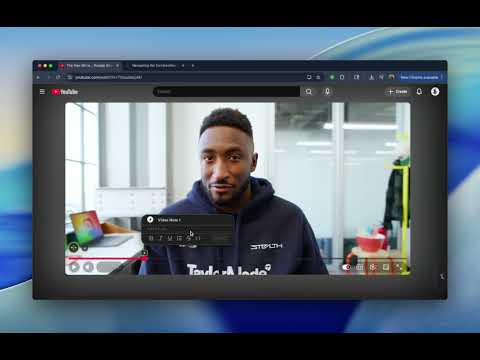
Take timestamped notes and highlights on YouTube videos and web pages — without switching tabs.
Melons lets you take timestamped notes on YouTube and annotate any web page — without leaving what you’re watching or reading. Capture ideas the moment they happen. Highlight text, add private comments, and draw directly on pages, images, and diagrams. Your notes stay exactly where you made them. ✨ What you can do with Melons: - Take timestamped notes on YouTube videos - Highlight text and add private comments on any website - Draw directly on pages, images, maps, and diagrams - Keep notes visible in context, not in a separate app - Work instantly — no setup, dashboards, or learning curve 🔒 Private by design - Everything is stored locally on your device - No accounts, no logins, no subscriptions - Your notes are yours — forever Melons is perfect for learning, research, tutorials, planning, and deep thinking — like margin notes for the modern web.
0 out of 5No ratings
Details
- Version0.0.1
- UpdatedFebruary 20, 2026
- FeaturesOffers in-app purchases
- Offered byThe Peace Effect
- Size1.19MiB
- LanguagesEnglish (United States)
- DeveloperPeacemake Bakinahe
12 Tamarack Rd Sparta, NJ 07871-1712 USEmail
peacemaker@terry.healthPhone
+1 973-896-2598 - TraderThis developer has identified itself as a trader per the definition from the European Union and committed to only offer products or services that comply with EU laws.
Privacy

Melons: YouTube Notes & Web Annotations has disclosed the following information regarding the collection and usage of your data. More detailed information can be found in the developer's privacy policy.
Melons: YouTube Notes & Web Annotations handles the following:
This developer declares that your data is
- Not being sold to third parties, outside of the approved use cases
- Not being used or transferred for purposes that are unrelated to the item's core functionality
- Not being used or transferred to determine creditworthiness or for lending purposes
Support
For help with questions, suggestions, or problems, visit the developer's support site