

MeetMute: Mute Mic for Google Meet – Auto-Mute, Shortcut & Push-to-Talk
10 ratings
)
Overview
Mute & unmute Google Meet from any tab: floating mic + camera button, hotkey, auto-mute on join, push-to-talk & hot-mic alerts.
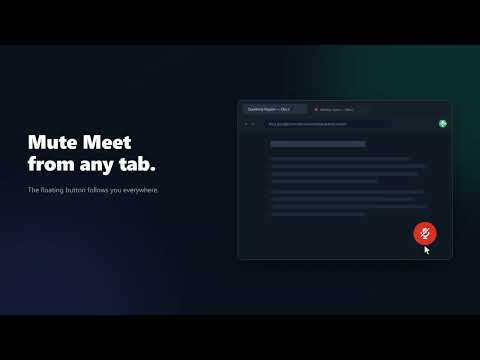
MeetMute puts your Google Meet microphone and camera one click away on every tab. Mute or unmute, turn the camera off, stop sharing your screen or leave the call, without switching back to Meet. While you're on a call, a small floating button follows you around the browser, and the toolbar icon shows your mic status at a glance: green is live, red is muted, gray means idle. KEY FEATURES • Floating button everywhere: mic, camera, jump back, stop sharing and leave • Keyboard shortcut (hotkey): Ctrl+Space on Windows, Linux and ChromeOS, ⌥M (Option+M) on Mac; change it any time • Push-to-talk: hold the shortcut to talk, release to go quiet again • Join meetings muted: optional auto-mute and camera-off on join, without overriding a change you make yourself in the green room • Hot-mic alert: a notification with one-tap actions if you're left live after switching to another tab • Screen-share indicator: see at a glance that you're presenting, and stop sharing from anywhere • Toolbar panel: every action right from the MeetMute icon, even with the floating button off • Two calls at once: a warning when both are open, and MeetMute follows the one you're looking at • Your way: put it on any screen edge, show it only while you're live, hide it on chosen sites or turn it off, and pick sounds and notifications HOW TO USE 1. Install MeetMute and join a call 2. Use the floating button, the toolbar icon or your keyboard shortcut from anywhere 3. Open Settings to set up push-to-talk, joining muted and the hot-mic alert FREQUENTLY ASKED QUESTIONS Does it work on Mac? Yes. The default shortcut on Mac is ⌥M (Option+M); on Windows, Linux and ChromeOS it's Ctrl+Space. You can change it at chrome://extensions/shortcuts. Can I join every meeting muted? Yes. Turn on the join options in Settings. They set your default; you can still switch your mic or camera on in the green room. How do I hide the floating button? Click its ×, or choose in Settings whether it shows always, only while you're live, or never. The toolbar icon still does everything. PRIVACY MeetMute runs in your browser and only works with Google Meet pages to detect your call and mute state. It never records or sends your audio, video, chat or contacts. No ads. No analytics. No tracking. No accounts. If MeetMute itself hits an error, it sends an anonymous technical report (the error, the extension version and your browser language; never page URLs, meeting codes or names) so bugs get fixed. You can turn this off any time in MeetMute's settings, under Diagnostics. PERMISSIONS • meet.google.com access: follow the Meet page and press its own controls for you • All sites access (optional): show the floating button on other sites while you're in a meeting • Notifications: optional confirmations and the hot-mic alert • Storage: save your preferences on your device Works with personal Google accounts, Google Workspace and Workspace for Education. If you find MeetMute useful, please leave a rating. It helps others discover the extension!
5 out of 510 ratings
Details
- Version1.0.23
- UpdatedOctober 13, 2026
- Offered byzubayet.zico
- Size411KiB
- Languages20 languages
- DeveloperZubayet Zaman Zico
58/1, West Rajabazar, Dhaka: 1215 Dhaka 1215 BDEmail
zubayet.zico@gmail.com - Non-traderThis developer has not identified itself as a trader. For consumers in the European Union, please note that consumer rights do not apply to contracts between you and this developer.
Privacy

This developer declares that your data is
- Not being sold to third parties, outside of the approved use cases
- Not being used or transferred for purposes that are unrelated to the item's core functionality
- Not being used or transferred to determine creditworthiness or for lending purposes