


概述
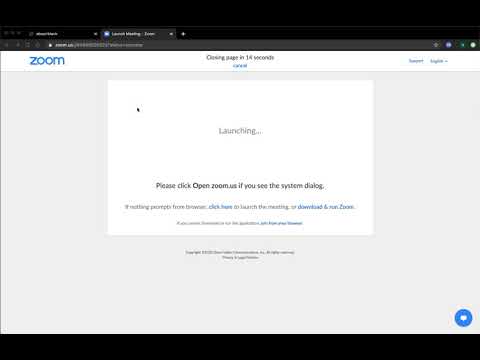
Automatically closes the page opened by Zoom to launch meetings and restores focus to the tab you were on before opened.
Tired of those lingering redirect tabs? Close them automatically! Works with popular platforms like Zoom! This extension will keep your Chrome running fast and smooth by automatically closing the page used to launch Zoom meetings after you've joined and restores focus to the tab you were on beforehand. The most user friendly Redirect Closer you'll find in the store that uses the least permissions while giving you the ability to cancel the auto close timer. We natively blend in with the Zoom UI for a seamless experience. This extension Auto closes the Zoom tab after joining the meeting. Complete privacy. Contains no analytics. Zero dependencies. This extension is HIPAA and GDPR compliant. Experiencing issues? Please report them here: https://forms.gle/Y64QCYkRfFd2qVXm7 Fully open source, safe, and secure: https://github.com/ChromeAdmin/meetings-page-auto-closer-for-zoom Privacy Policy: https://github.com/ChromeAdmin/meetings-page-auto-closer-for-zoom/blob/master/PRIVACY_POLICY.md Notices: This extension is not affliated, authorized by, endorsed by, or produced by Zoom Video Communications. ZOOM is a trademark of Zoom Video Communications, Inc. All other trademarks are the property of their respective holders. Changelog: Last updated to allow easier closing and configurable close timer.
4.8 星(5 星制)27 个评分
详情
隐私权

该开发者已声明,您的数据:
- 不会因未获批准的用途出售给第三方
- 不会为实现与产品核心功能无关的目的而使用或转移
- 不会为确定信用度或放贷目的而使用或转移
支持
若有任何疑问、建议或问题,请在桌面浏览器中打开此页面