


Overview
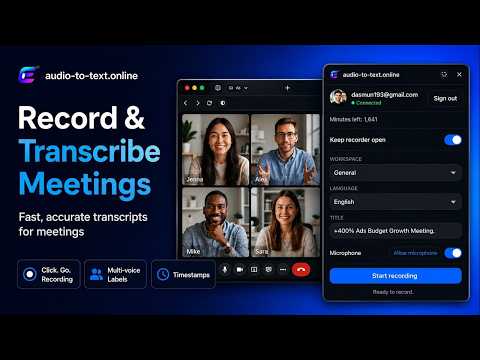
Record Google Meet, Zoom and Teams calls in Chrome, then get transcripts, notes and action items in Orynote.
Orynote is a meeting recorder and AI meeting transcriber for Chrome. Record audio from Google Meet, Zoom, and Microsoft Teams meetings in your browser, then send the recording to Orynote for automatic transcription, notes, and action items in your dashboard. Use Orynote to: ✅ Record Google Meet meetings ✅ Record Zoom meetings opened in Chrome ✅ Record Microsoft Teams meetings opened in Chrome ✅ Transcribe webinars, demos, interviews, client calls, and team meetings ✅ Organize meeting transcripts by workspace ✅ Choose the language and meeting title before recording ✅ Review transcripts, notes, and action items from one dashboard How it works: 1. Open your meeting in Chrome. 2. Connect your Orynote account in the extension. 3. Choose a workspace, language, and title. 4. Click Start recording. 5. Click Finish & transcribe. 6. Open your Orynote dashboard to review the transcript. Orynote is built for meeting transcription, interview transcription, call transcription, AI meeting notes, and searchable meeting records. An Orynote account is required. Create one at https://orynote.com before using the extension. New accounts include free transcription minutes. After your free minutes are used, you can choose pay as you go or a monthly minutes plan.
0 out of 5No ratings
Details
- Version10.15
- UpdatedJune 17, 2026
- FeaturesOffers in-app purchases
- Size157KiB
- LanguagesEnglish (United States)
- DeveloperWebsite
Email
support@audio-to-text.online - Non-traderThis developer has not identified itself as a trader. For consumers in the European Union, please note that consumer rights do not apply to contracts between you and this developer.
Privacy

Orynote Meeting Recorder & Transcriber has disclosed the following information regarding the collection and usage of your data. More detailed information can be found in the developer's privacy policy.
Orynote Meeting Recorder & Transcriber handles the following:
This developer declares that your data is
- Not being sold to third parties, outside of the approved use cases
- Not being used or transferred for purposes that are unrelated to the item's core functionality
- Not being used or transferred to determine creditworthiness or for lending purposes
Support
For help with questions, suggestions, or problems, please open this page on your desktop browser