

Media Viewer for Discord

Overview
Browse every image and video loaded in the current Discord channel full-screen, with keyboard shortcuts.
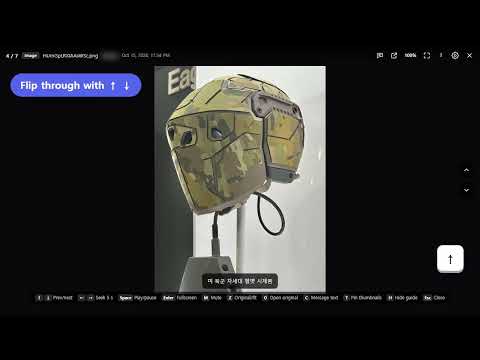
Patreon: https://www.patreon.com/c/vgworkbench/membership Liberapay: https://liberapay.com/OhSeyoung/donate Media Viewer for Discord shows the images and videos in your open Discord channel one at a time, full screen, so you can flip through them with the keyboard. ■ HOW TO OPEN Open a channel on discord.com, then click the extension's toolbar button or press Alt+Shift+V. ■ KEYBOARD SHORTCUTS Navigate: ↑ / ↓ previous / next media, Esc close Video: Space play / pause, ← / → seek 5 seconds, M mute View: Enter full screen, Z original size / fit to screen More: O open original, C message text, T pin thumbnails, H shortcut guide ■ FEATURES ✔ Original quality — shows the original file at 100% instead of Discord's small preview. Large images fit the screen; click to zoom in and drag to look around. ✔ Videos and link previews — videos autoplay and loop. YouTube links play right in the viewer with the same shortcuts, and videos from other link previews are shown too. ✔ Instant switching — the next and previous media are loaded in advance. ✔ Thumbnails — move the mouse to the bottom edge to see every item and a progress bar; drag the bar to jump around quickly. ✔ Message text — shows who posted each item and what they wrote, including server emoji and clickable links. ✔ Older media — older messages load automatically as you reach the first item. ✔ Safe typing — while the viewer is open, keys never reach Discord, so Enter can't send a half-written message. ✔ Options — auto-load distance, number of preloaded items, spoiler handling. ✔ Available in 8 languages ■ PRIVACY Everything runs inside your browser. Message text and media are read only to show them; nothing is stored except the extension's settings, and nothing is sent anywhere. Videos embedded from other sites play in that site's own player, just as in Discord. This extension is not affiliated with or endorsed by Discord Inc.
0 out of 5No ratings
Details
- Version1.0.1
- UpdatedOctober 19, 2026
- Offered bydhtpdud528
- Size78.81KiB
- Languages8 languages
- Developer
Email
dhtpdud528@gmail.com - Non-traderThis developer has not identified itself as a trader. For consumers in the European Union, please note that consumer rights do not apply to contracts between you and this developer.
Privacy

Media Viewer for Discord has disclosed the following information regarding the collection and usage of your data. More detailed information can be found in the developer's privacy policy.
Media Viewer for Discord handles the following:
This developer declares that your data is
- Not being sold to third parties, outside of the approved use cases
- Not being used or transferred for purposes that are unrelated to the item's core functionality
- Not being used or transferred to determine creditworthiness or for lending purposes
Support
For help with questions, suggestions, or problems, please open this page on your desktop browser