

Prompt Managers | Suggestions & Autocomplete For ChatGPT | Gemini | Grok

Overview
Prompt Managers | Suggestions & Autocomplete For ChatGPT | Gemini | Grok
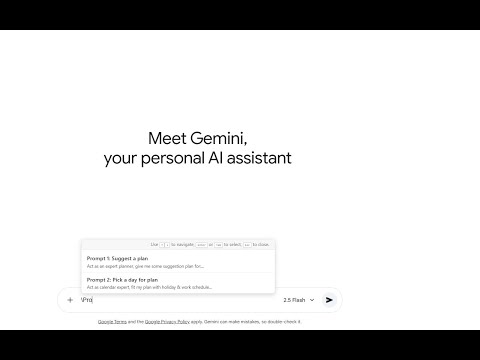
Prompt Managers: Quick Prompt Insertion for ChatGPT | Gemini | Grok The Prompt Managers extension is designed to revolutionize how you interact with chat interfaces like ChatGPT and Gemini. Stop copying and pasting your favorite or most-used prompts! This tool allows you to save your essential prompts and insert them instantly with a simple keyboard shortcut. Key Features: ⚡️ Instant Insertion: Simply type the backslash character (\) in the chat input field, and a dropdown of your saved prompts will appear. Select a prompt to insert its full text instantly at the cursor position. 💾 Easy Management: Access the extension's popup to easily view, add, and manage your saved prompts. 🔍 Quick Search/Filter: Use the built-in search bar in the extension popup to instantly filter your prompt list by name/keyword. 🔄 Import/Export: Protect your data! The dedicated Options Page allows you to Export all your saved prompts as a JSON file for backup and to Import new prompt lists, making it easy to share or transfer your data. ✅ Simple & Fast: Built for speed and a clean, intuitive user experience (UI/UX). How it works: Click the extension icon to open the popup. Add a new prompt with a name and the full text. Go to a supported chat site (e.g., chat.openai.com). Type \ in the message box, select your prompt, and press Enter to insert!
5 out of 51 rating
Details
- Version1.3
- UpdatedOctober 13, 2026
- Size38.64KiB
- Languages4 languages
- DeveloperWebsite
Email
admin@hamatim.com - Non-traderThis developer has not identified itself as a trader. For consumers in the European Union, please note that consumer rights do not apply to contracts between you and this developer.
Privacy

This developer declares that your data is
- Not being sold to third parties, outside of the approved use cases
- Not being used or transferred for purposes that are unrelated to the item's core functionality
- Not being used or transferred to determine creditworthiness or for lending purposes
Support
For help with questions, suggestions, or problems, visit the developer's support site