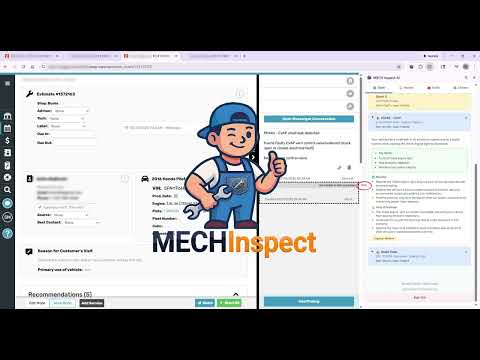


Overview
Reads work-order vehicle data from your shop management software and helps you diagnose, plan, and document repairs with AI.
MECH Inspect AI analyzes your customers' service history, finds maintenance gaps, and generates targeted upsell recommendations - automatically. Quick 4-corner tire and brake inspections sent straight to the RO note. No more guessing what's due. No more missed revenue. ──────────> 🆕 What's new in this version: 3.11.0: Tire Health Report drawer - quick 4-corner tire inspection sent straight to the RO note with a color-coded PNG and a shop-voiced recommendation. Wear-pattern chips auto-add a 4-wheel alignment rec; your shop's alignment video auto-attaches when applicable. 3.11.0: Brake Health Report drawer - quick 4-corner brake inspection (disc or drum, /32 or mm). Axle-pair rules (pads+rotors together, calipers and wheel cylinders both axle-pair), "(due to …)" reasoning when a condition drives the rec, and your shop's brake-flush video + service template auto-append when a flush is recommended. 3.10.0: Friendly Competition - monthly shop leaderboard with prizes. Tap the trophy in the side panel footer to see your rank in the shop and your shop's rank in the enterprise. ──────────> 💰 INTELLIGENT HISTORY ANALYSIS & UPSELL GENERATION The Problem: Customers come in for one thing, but you know they need more. The service history is buried in your shop software. Your advisor doesn't have time to dig through years of records to find what's overdue. The Solution: MECH Inspect automatically analyzes the complete service history and generates prioritized recommendations in seconds. What It Finds: • Never-done services - Maintenance that has NO record in your shop's history (transmission fluid, differential service, coolant flush, etc.) • Overdue maintenance - Services past their manufacturer-recommended interval based on time or mileage • Declined work - Repairs the customer said "no" to previously that are now due • Upcoming maintenance - Services approaching their interval so you can proactively recommend • Original-tech attribution - Each past service is tagged with the tech who performed it, so follow-up work routes back to the person already familiar with the vehicle How It Prioritizes: The AI ranks recommendations by urgency. Safety items come first. Then overdue maintenance. Then preventive items. Your advisor sees exactly what to focus on. Ready-to-Use Output: Each recommendation includes a complete sales talk track with specific benefits, risks of declining, and urgency level. Your advisor can present confidently without scrambling to explain why the customer needs it. Customer Insights at a Glance: Beyond the recommendations, MECH Inspect surfaces the customer's value to your shop at a glance — total visits, lifetime spend, average RO, days since last visit, and a color-coded tier stripe. Your advisor knows whether they're talking to a 12-year regular with $18K in lifetime spend or a first-time walk-in before the conversation even starts. AI That Learns From Your Shop: Disagree with a recommendation, or know the labor time should be different for your area? Flag it with one click. MECH Inspect logs your correction so future analyses for similar vehicles trend toward your shop's reality, not generic averages. The longer your shop uses it, the more it sounds like your shop. Real Example: Customer brings in a 2019 Jeep Grand Cherokee for an oil change at 87,000 miles. MECH Inspect analyzes the history and finds: Transmission fluid - NEVER DONE (due at 60k) Spark plugs - NEVER DONE (due at 100k, but recommend now while accessible) Brake fluid flush - Last done 3 years ago (overdue) Cabin air filter - Declined 8 months ago Coolant flush - Due at 90k (upcoming) That's 5 upsell opportunities from one oil change, each with a talk track ready for your advisor. 🛞 TIRE HEALTH REPORT The Quick 4-Corner Inspection That Closes Itself Open the Dash tab, tap each tire, enter the tread depth and any wear conditions (feathering, cupping, belt separation, free play, uneven wear, TPMS). Hit Send to Ticket — MECH Inspect attaches a color-coded report image to the open RO note and injects a shop-voiced recommendation in one tap. What It Adds: • Customer-ready PNG showing all four corners with color bands (red/yellow/green) and per-tire findings - the kind of report that closes the sale on the spot • Auto-generated "Tire Check" summary written in tech voice, with axle-paired replacement recommendations (front/rear tires, not LF/RF individually) • Wear-pattern chips automatically add a 4-wheel alignment recommendation — root-cause the wear before more tread is lost • Service flags for TPMS lights (on / flashing), AWD vehicles, and "Pulls left/right" driving complaints • Your shop's alignment video auto-attaches to the RO when alignment is recommended — no manual library hunt Belt separation or unrepairable leak force replacement regardless of remaining tread, with the reason called out in the rec line ("(due to belt separation)"). Free play surfaces as its own suspension/steering diagnostic rec - not a tire replacement. 🛑 BRAKE HEALTH REPORT Same Workflow, For Brakes Disc or drum. /32 or mm - your call, persisted per device. Tap each corner, enter pad or shoe thickness, flag any pad/rotor/caliper concerns. Send to Ticket attaches the PNG report and injects the recommendation. 12 Disc Chips Per Corner: Pad - Uneven wear, Noisy, Poor contact, Glazed Rotor - Grooved/lipped, Surface rust, Warped, Hot spotted Caliper - Seized, Slides stuck, Broken bleeder, Leaking Drum Brake Mode: Toggle "Drums (rear)" in Service Flags and the rear axle switches to a drum chip set - Shoes (Clean & adj. / Noisy / Delaminated), Wheel Cylinder (Leaking / Broken bleeder), and Other (Replace drums / Replace hardware / Axle seal leaking). Smart Recommendation Engine: • Pads and rotors always replaced together (shop policy - fresh pads on a worn rotor surface promote uneven wear and noise) • Calipers and wheel cylinders both axle-pair (matched hydraulic balance is shop policy) • Replace recs auto-include a brake-flush line - the hydraulic system gets disturbed, fluid should be fresh going back in • Your shop's brake-flush video and matching service template auto-append when flush is recommended • EPB checkbox produces "Recalibrate electronic parking brake system" - but only when the rear is actually being replaced (skipped on drum vehicles, which don't have electronic parking calipers) 6 Brake Service Flags: Red brake light, ABS light, Drums (rear), EPB, PB doesn't hold, Pulsation/Shaking - each drives a tailored rec line. Reasoning You Can Show The Customer: When a Replace rec is driven by a condition rather than depth (e.g., warped rotors with 6/32 of pad left), the rec includes "(due to warped rotors)" so the customer sees the why before they ask. 🔧 COMPREHENSIVE DIAGNOSTIC ANALYSIS For Technicians Who Want Answers Fast Enter any DTC code (P0300, P0171, B1234, U0100, etc.) or describe a symptom ("rough idle when cold", "intermittent no-start") and get a complete diagnostic breakdown. What You Get: Code Definition & Severity Plain-English explanation of what the code means, not just the generic OBD description. Includes severity rating so you know if it's safe to drive or needs immediate attention. Common Causes (Ranked by Probability) Not just a list of everything that could cause the code - causes are ranked from most likely to least likely based on the specific vehicle. A P0300 on a Ford 5.4L has different probable causes than a P0300 on a Toyota 2GR-FE. Step-by-Step Diagnostic Procedure Actual diagnostic steps in order. What to check first, what tools you need, what readings to expect. Written by techs, for techs. Labor Time Estimates How long the diagnosis and common repairs typically take. Helps with quoting and scheduling. Safety Warnings Critical warnings when applicable. High voltage on hybrids, fuel system pressure, airbag precautions, etc. Related Codes Other codes that commonly appear with this one. Helps identify root cause vs. symptom codes. Symptom-Based Diagnostics Don't have a code? Describe the symptom. "Car shakes at highway speed" or "AC blows warm intermittently" - MECH Inspect walks you through diagnostic trees based on the symptom description. 💼 SALES TOOLS THAT ACTUALLY CLOSE Talk Tracks That Convert Every repair recommendation - whether from diagnostics, history analysis, or manual entry - gets a complete sales presentation package. What's Included: Conversational Script Word-for-word what to say to the customer. Not robotic scripts - natural conversation starters and explanations. "Mr. Johnson, while we had your vehicle up on the lift, we noticed your brake fluid hasn't been flushed in over 3 years..." Specific Benefits Why the customer should care, in terms they understand: • "Extends transmission life by preventing wear from degraded fluid" • "Could save you $3,000+ in transmission repairs down the road" • "Maintains smooth shifting and fuel efficiency" Risk Explanation What happens if they say no: • "Degraded fluid causes increased internal wear" • "Can lead to harsh shifting, slipping, or complete transmission failure" • "Repair costs average $2,500-$4,500 for transmission rebuild" Urgency Indicator Color-coded priority level: 🔴 HIGH - Safety concern or imminent failure risk 🟡 MEDIUM - Overdue but not immediately critical 🟢 LOW - Preventive/recommended One-Click "Sell All" Hit the Sell button on any RO and MECH Inspect generates a structured sell presentation for every recommended service at once - laid out in a diagnostic-flow style your advisor can step through with the customer. No more cobbling together pitches from scratch when there are five upsells on the ticket. One-Click Note Polishing For Technicians: Turn shorthand into professional documentation instantly. • Input: "ck eng lite on p0300 misfr cyl 3 found bad coil pack replaced coil and plug test ok lite off" • Output: "Check engine light on. Retrieved code P0300 — random/multiple cylinder misfire. Diagnosed misfire isolated to cylinder 3. Found faulty ignition coil pack. Replaced ignition coil and spark plug on cylinder 3. Verified repair - test drive completed, no misfires detected, check engine light off." Preserves your measurements exactly (3/32" stays 3/32"). Expands abbreviations. Formats multi-point inspections into readable paragraphs. Auto-recommends related services (brake fluid flush with brake work, alignment with suspension/steering, induction service with spark plugs, etc.) so nothing gets left off the ticket. For Advisors: Turn tech notes into customer-friendly explanations. • Professional tone that builds trust • Clear timelines ("recommended within the next 30 days" not "soon") • Proper handling of declined services For Customer Intake: Turn rushed phone-call notes into a clean intake brief - what the customer reported, when it happens, what they want diagnosed - formatted for the tech to pick up without re-interviewing the customer. For Findings Summary: Combine every finding from a multi-point inspection into one customer-ready summary. Group by urgency, drop redundancies, and produce a single message the advisor can read straight off the lift report. ⚡ SHOP SOFTWARE INTEGRATION Works Inside Your Existing Workflow MECH Inspect opens as a Chrome side panel directly alongside your shop management software. No switching tabs. No copy-pasting VINs. No interrupting your workflow. Automatic Vehicle Detection: When you open a customer's record in your shop software, MECH Inspect automatically detects the vehicle. VIN, year/make/model/engine, current mileage, RO number - all captured without any manual entry. Support for additional browser-based shop management systems and digital vehicle inspection (DVI) platforms is on our roadmap. 🛠️ ADDITIONAL TOOLS Scan Report → RO Notes Upload a diagnostic scan-tool PDF, a photo of your scanner screen, or paste a screenshot - MECH Inspect returns a clean, module-grouped list of every trouble code, formatted and ready to paste into the RO. Perfect for documenting pre-existing and intermittent codes before service so the tech and shop aren't blamed later for conditions that were already there. Photo Markup Annotate RO photos directly in the lightbox without downloading, editing, and re-uploading. Circle, arrow, and text tools in 5 colors, drag-to-size shapes, undo support. The marked-up image replaces the original on the RO in one click. Video Library Training and reference videos accessible right from the side panel - no separate tab, no hunting through YouTube. Tap an item to play inline or attach the MP4 directly to the active RO note in one click. Job Planner & Estimator Quick labor time lookups and job planning. Enter a job description and get: • Estimated labor hours • Parts typically required • Common upsell opportunities for that job • Notes on vehicle-specific considerations TSB & Recall Checker Real-time lookup against the NHTSA database. Enter symptoms or just check the vehicle - see all open recalls and potentially relevant Technical Service Bulletins. Includes: • Campaign numbers • Affected components • Full recall description • Remedy information Shop Library Store and access your shop's note templates, reference photos, and training videos. Common inspection notes, canned responses, before/after shots - all accessible from the side panel and attached directly to the active RO note in one click. No download-edit-reupload - click an item and it slides straight into the RO note. 🔒 BUILT FOR REAL SHOPS Multi-User Organization Accounts Set up your whole shop. Technicians and advisors each get their own login with role-appropriate tools. Shared vehicle history cache means everyone sees the same recommendations. Shop Analytics Dashboard Owners and managers get a companion web dashboard tracking how the team uses MECH Inspect: top users, daily activity, action mix, ROI estimates, and which features are driving the most value. Know which advisors are pitching upsells, which techs are running diagnostic queries, and the dollar impact of the tool over time. 🏆 Friendly Competition Monthly shop leaderboard with prizes - tap the trophy in the side panel footer to see your individual rank in your shop and your shop's rank in the enterprise (for multi-shop operators). Points come from work you're already doing (inspections, polishes, job plans, sells, photo markups), with daily caps to keep it fair. Closed cycles snapshot the winners and stick around for history. Enterprise admins set the prize text from the dashboard. Off by default; enterprise admins opt in. Role-Based Interface • Technicians see diagnostic tools and tech note polishing • Advisors see sales tools, talk tracks, and customer-facing features • Switch roles with one click Secure & Private • No customer personal information stored (names, addresses, phone numbers) • Only technical vehicle data (VIN, mileage, license plate, service records) • Encrypted connections • 48-hour cache expiration Works With Your Process MECH Inspect doesn't replace your workflow - it enhances it. Keep using your shop software exactly as you do now. MECH Inspect just adds intelligence on the side. Ready to stop missing upsells and start closing more work? Get started at MECHinspect.ai Built by shop owners who got tired of leaving money on the table. ────────── TRADEMARK NOTICE & DISCLAIMERS MECH Inspect is an independent product of 404 Innovationz LLC. We are not affiliated with, sponsored by, endorsed by, or partnered with any third-party shop management software, vehicle manufacturer, OEM, or government agency referenced anywhere in this listing or in the extension itself. All trademarks, brand names, and logos are the property of their respective owners. References to third-party products, names, or marks are made for identification and interoperability purposes only and do not imply any sponsorship or endorsement. Diagnostic suggestions and recommendations are produced by
0 out of 5No ratings
Details
- Version3.11.1
- UpdatedMay 24, 2026
- FeaturesOffers in-app purchases
- Size2.33MiB
- LanguagesEnglish (United States)
- Developer404 Innovationz LLCWebsite
9230 Old Keene Mill Rd #1004 Burke, VA 22015-4201 USEmail
sales@mechinspect.aiPhone
+1 703-278-2940 - TraderThis developer has identified itself as a trader per the definition from the European Union and committed to only offer products or services that comply with EU laws.
- D-U-N-S142465333
Privacy

MECH Inspect AI has disclosed the following information regarding the collection and usage of your data. More detailed information can be found in the developer's privacy policy.
MECH Inspect AI handles the following:
This developer declares that your data is
- Not being sold to third parties, outside of the approved use cases
- Not being used or transferred for purposes that are unrelated to the item's core functionality
- Not being used or transferred to determine creditworthiness or for lending purposes
Support
For help with questions, suggestions, or problems, please open this page on your desktop browser