

LinkFlags - Preview Signals Beside Links
3 ratings
)
Overview
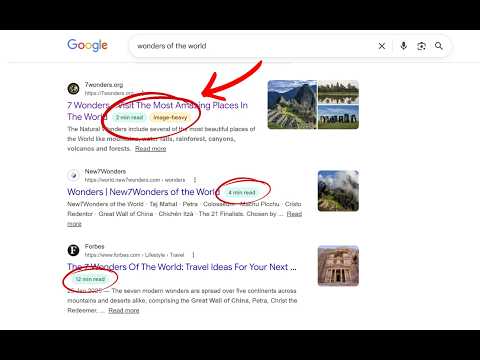
Shows read time, image-heavy, code-heavy and paywall flags next to Google Search links before you click.
LinkFlags adds smart insights beside links directly in Google Search results, helping you decide what to open before clicking. No more guessing whether a page is a quick skim, a deep 15-minute read, packed with visuals or code, or hidden behind a paywall. Features • Shows read time next to search results • Detects potential paywalled pages before you open them • Highlights image-heavy pages (great for visual guides & tutorials) • Detects code-heavy pages (perfect for developers & technical docs) • Personalized estimates based on your own reading speed • Quick popup settings to adjust WPM (Words Per Minute - Reading Speed) • Clean, lightweight, fast interface • Helps save time while researching or browsing Why it matters Not all pages are the same. Some are: • 📄 Text-heavy deep dives • 🖼️ Visual tutorials • 💻 Code/documentation pages • 🔒 Subscriber-only or restricted articles LinkFlags helps you understand the type of content before clicking, so you can choose what fits your time and intent. Perfect for • Students doing research • Busy professionals • Casual readers • Productivity-focused users • Developers browsing documentation • Anyone who values their time Supported Search Engines • Google • Bing Supported browsers • Chrome • Microsoft Edge • Firefox
3.7 out of 53 ratings
Details
- Version2.4.0
- UpdatedMay 26, 2026
- Offered byKenzorb
- Size34.63KiB
- LanguagesEnglish (United States)
- Developer
Email
kenkei1913@gmail.com - Non-traderThis developer has not identified itself as a trader. For consumers in the European Union, please note that consumer rights do not apply to contracts between you and this developer.
Privacy

LinkFlags - Preview Signals Beside Links has disclosed the following information regarding the collection and usage of your data. More detailed information can be found in the developer's privacy policy.
LinkFlags - Preview Signals Beside Links handles the following:
This developer declares that your data is
- Not being sold to third parties, outside of the approved use cases
- Not being used or transferred for purposes that are unrelated to the item's core functionality
- Not being used or transferred to determine creditworthiness or for lending purposes
Support
For help with questions, suggestions, or problems, please open this page on your desktop browser