

Popcorn: IMDb/RT on Netflix, Prime, Hotstar, hbo, hulu & more

Overview
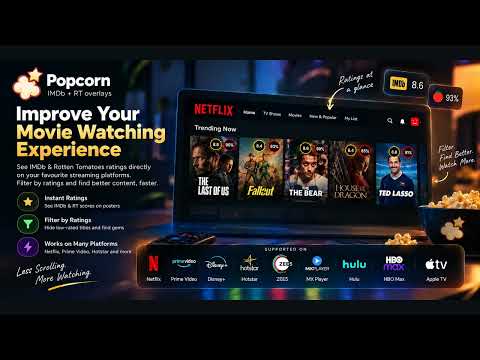
Free IMDb and Rotten Tomatoes score overlays on supported streaming catalogs
Popcorn shows IMDb and Rotten Tomatoes scores on title cards while you browse, so you can decide what to watch without leaving the page. KEY FEATURES • Critic and audience scores on supported streaming catalogs (Tomatometer always; Audience Score when the ratings API provides it) • Ratings appear automatically on browse cards, detail pages, and hover previews where available • Overlay panel: Standard or Neon chips, size, and which sources to show • Optional fade filters: dim titles below your score thresholds (missing scores stay visible) • In-page assistant on supported sites for quick filter access (same settings as the toolbar popup) • Toolbar popup: Overlay, Filters, which catalogs to enhance, rate on the Chrome Web Store, support Popcorn, and share or copy the listing link • Lightweight, non-intrusive overlays HOW IT WORKS • Install the extension (no setup required) • Open a supported streaming site while logged in • Ratings appear on titles as you browse • Open the Popcorn toolbar icon to adjust the overlay, filters, catalogs, rate, support, or share PRIVACY • Access to supported streaming sites is required only to show ratings on those pages • Title identifiers needed for lookups are sent to Popcorn’s ratings API (popcornclub.in) • Filter and overlay preferences are stored locally in your browser • No personal account data is collected for ads or profiling Built with Manifest V3. Titles without a match simply show no badge—nothing is invented. Popcorn is not affiliated with the streaming services or rating sources it displays.
4.8 out of 518 ratings
Details
- Version1.4.1
- UpdatedOctober 20, 2026
- Size734KiB
- LanguagesEnglish
- DeveloperWebsite
Email
popcornclubin@gmail.com - Non-traderThis developer has not identified itself as a trader. For consumers in the European Union, please note that consumer rights do not apply to contracts between you and this developer.
Privacy

This developer declares that your data is
- Not being sold to third parties, outside of the approved use cases
- Not being used or transferred for purposes that are unrelated to the item's core functionality
- Not being used or transferred to determine creditworthiness or for lending purposes
Support
For help with questions, suggestions, or problems, please open this page on your desktop browser