

GestureSlide
1 rating
)
Overview
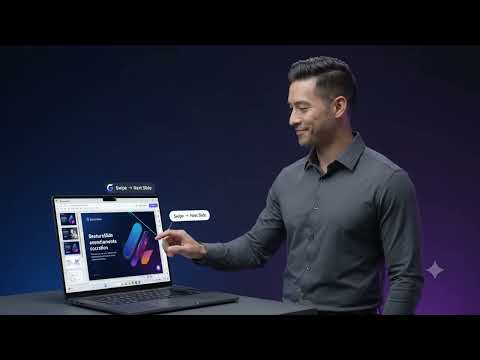
Control presentations and annotate slides with hand gestures from your webcam. Everything is processed locally.
GestureSlide lets you run a presentation without reaching for the keyboard or mouse. Swipe your hand to change slides, and draw on the slide with your finger, using nothing but your webcam. Everything happens on your device. Camera frames are analysed locally and never leave your computer. NAVIGATION • Swipe right for the next slide, swipe left for the previous one. • Adjustable sensitivity and cooldown, so one swipe moves one slide. • A brief on-screen confirmation shows when a gesture is recognised. ANNOTATION • Pen, laser pointer and eraser, with undo, clear, five colours and three brush sizes. • Draw with your index finger, or with the mouse. • The laser leaves a glowing trace that fades once you release. • The toolbar sits on the page itself, so it stays visible to your audience while you share your screen. • Annotations clear automatically when the slide changes. USE IT WITHOUT A CAMERA The camera is optional. Switch hand tracking off and GestureSlide becomes a mouse-driven annotation tool. No camera is opened and no camera permission is requested. PRIVACY • Camera frames are processed locally, inside your browser. • Nothing is uploaded, recorded or sent anywhere. • No accounts, no tracking, no analytics. • The camera runs only while hand tracking is switched on, and stops as soon as you switch it off. WHERE IT WORKS • Google Slides, including presentation mode. • Web slide viewers that have their own Next and Previous controls. GestureSlide finds those controls and uses them. • Pages that respond to the arrow keys, including local HTML decks. If a site needs it, you can choose how commands are delivered in Settings. PERMISSIONS • Camera: only while hand tracking is on, to detect your hand. • Storage: to remember your settings. • Active tab and scripting: to add the annotation toolbar and change slides on the tab you choose. • Offscreen: to keep hand detection running while you look at your slides rather than at the extension.
5 out of 51 rating
Details
- Version0.6.1
- UpdatedSeptember 13, 2026
- Size12.28MiB
- LanguagesEnglish
- Developer
Email
momengharib22@hotmail.com - Non-traderThis developer has not identified itself as a trader. For consumers in the European Union, please note that consumer rights do not apply to contracts between you and this developer.
Privacy

This developer declares that your data is
- Not being sold to third parties, outside of the approved use cases
- Not being used or transferred for purposes that are unrelated to the item's core functionality
- Not being used or transferred to determine creditworthiness or for lending purposes