


Overview
Watch Netflix, Disney+, Prime, YouTube & HBO Max together. Synced playback, live chat, camera calls & AI features. Free for up to 2.
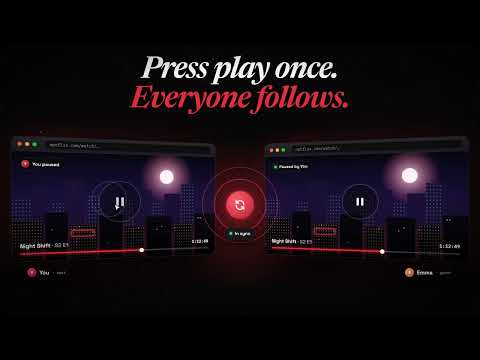
WatchNest — Watch Party Extension Watch together, in perfect sync — no matter the distance. WatchNest is a free watch party extension for Chrome. Create a private room in seconds, share one link, and watch your favorite streaming service in sync with your partner, friends, or family. Real-time chat is free for two; emoji reactions and live video calls come with the paid plans. It is built specifically for couples and small groups. ───────────────────────────────────── HOW IT WORKS ───────────────────────────────────── 1. Install WatchNest and open a movie or episode on a supported streaming service 2. Click "Create Room" — a private invite link is generated instantly 3. Share the link with whoever you want to watch with 4. Watch together, perfectly in sync — chat, react, and video call in real time No account needed for guests. No downloads beyond the extension. Works entirely inside the streaming site. ───────────────────────────────────── KEY FEATURES ───────────────────────────────────── Synced Playback Every play, pause, seek, and speed change stays aligned across all participants. The host controls playback and guests follow automatically. If someone drifts out of sync, WatchNest corrects it silently. Live Room Chat Talk about what you're watching without leaving the tab. The chat sits right next to the player. Emoji Reactions (paid plans) Send floating emoji reactions timed to the exact moment in the show. Video & Audio Calls (paid plans) See each other while you watch, with video calls built directly into the watch room. No separate app or tab. Host Controls Optional host-only control mode lets one person manage playback for the whole room. Private Room Links Every room gets a unique private link. No public rooms, no strangers. ───────────────────────────────────── PERFECT FOR ───────────────────────────────────── Long-distance couples — watch your shows together across cities or countries, in sync and face to face. Friends who can't be in the same room — organize a movie night without anyone leaving home. Up to 4 participants on the Crew plan. Small private groups — WatchNest is intentionally designed for 2–4 people, so the experience stays personal and reliable. ───────────────────────────────────── WHY WATCHNEST INSTEAD OF TELEPARTY? ───────────────────────────────────── - Free for 2 people — synced playback and chat, no subscription required - Video calls included in the paid plans - Designed for couples and small groups - A clean interface next to the player - AI Premium plan with a spoiler-free AI companion, recommendations, and session recaps ───────────────────────────────────── PRICING ───────────────────────────────────── Free — Synced playback and room chat for 2 people. No credit card. No account. Duo — €4.90/month. Adds video and audio calls and emoji reactions for 2. Crew — €9.90/month. Up to 4 participants with video calls, reactions, and host controls. AI Premium — €14.90/month. Everything in Crew, plus a spoiler-free AI companion, group recommendations, and shareable session recaps. ───────────────────────────────────── SUPPORTED PLATFORMS ───────────────────────────────────── Works with Netflix, Disney+, Prime Video and other popular streaming services. The full, up-to-date list is on watchnest.party. ───────────────────────────────────── IMPORTANT ───────────────────────────────────── - Every participant installs WatchNest - Every participant needs their own streaming subscription where required - WatchNest is an independent product, not affiliated with any streaming service - Camera and microphone are only used when you turn them on — never recorded ───────────────────────────────────── FAQ ───────────────────────────────────── Is WatchNest free? Yes. Synced playback and live chat are free for 2 people. Do guests need an account? No. Guests join by clicking the room link. Is this the same as Teleparty? No. WatchNest is an independent extension with built-in video calls and a focus on small groups. Does it work for long-distance couples? Yes. Each person streams from their own account and playback stays in sync. Is the video call secure? Yes. Video calls use direct peer-to-peer WebRTC connections and are never recorded or stored.
0 out of 5No ratings
Details
- Version0.1.12
- UpdatedOctober 23, 2026
- FeaturesOffers in-app purchases
- Size5.08MiB
- LanguagesEnglish (United States)
- DeveloperWebsite
Email
contact@softwai.fr - Non-traderThis developer has not identified itself as a trader. For consumers in the European Union, please note that consumer rights do not apply to contracts between you and this developer.
Privacy

WatchNest has disclosed the following information regarding the collection and usage of your data. More detailed information can be found in the developer's privacy policy.
WatchNest handles the following:
This developer declares that your data is
- Not being sold to third parties, outside of the approved use cases
- Not being used or transferred for purposes that are unrelated to the item's core functionality
- Not being used or transferred to determine creditworthiness or for lending purposes
Support
For help with questions, suggestions, or problems, visit the developer's support site